• Skip to primary navigation
  • Skip to main content
  • Skip to primary sidebar
Sas 101

Sas 101

Master the Art of Building Profitable Software

  • Home
  • Terms of Service (TOS)
  • Privacy Policy
  • About Us
  • Contact Us
  • Show Search
Hide Search

Machine Learning

AI-Native .NET: Building Intelligent Applications with Azure OpenAI, Semantic Kernel, and ML.NET

UnknownX · January 10, 2026 · Leave a Comment

Building AI-Native .NET Applications with Azure OpenAI, Semantic Kernel, and ML.NET

 Executive Summary

Modern organizations are rapidly adopting AI-Native .NET approaches to remain competitive in an AI-accelerated landscape. Traditional .NET applications are no longer enough—teams now need systems that can reason over data, automate decision-making, and learn from patterns. Whether you’re building intelligent chatbots, document analysis pipelines, customer-support copilots, or predictive forecasting features, AI-Native .NET development using Azure OpenAI, Semantic Kernel, and ML.NET provides the optimal foundation.

This guide addresses a critical challenge: how to architect and implement artificial intelligence in .NET without reinventing the wheel, breaking clean architecture, or introducing untestable components. The real-world problem is clear—developers need a unified approach to orchestrate LLM calls, manage long-term memory and context, handle function calling, and integrate traditional machine-learning models inside scalable systems.

By combining Azure OpenAI for reasoning, Semantic Kernel for orchestration, and ML.NET for structured predictions, you can build production-ready, AI-Native .NET applications with clean architecture, testability, and maintainability. This tutorial synthesizes industry best practices into a step-by-step roadmap you can use immediately.


🛠️ Prerequisites for Building AI-Native .NET Apps

Before getting started, ensure you have the following setup.

Development Environment

  • .NET 8.0 SDK or higher

  • Visual Studio 2022 or VS Code with C# Dev Kit installed

  • Git for version control

  • Optional: Docker Desktop for local container testing

Azure Requirements

  • Active Azure subscription (free tier works to get started)

  • Azure OpenAI resource deployed with a GPT-4, GPT-4o, or newer model

  • Optional: Azure AI Search (for RAG/document intelligence scenarios)

  • Securely stored credentials:

    • API keys

    • Endpoint URLs

    • Managed Identity if working keyless

Required NuGet Packages:
– `Microsoft.SemanticKernel` (latest stable version)
– `Microsoft.Extensions.DependencyInjection`
– `Microsoft.Extensions.Logging`
– `Microsoft.Extensions.Configuration.UserSecrets`
– `ML.NET` (for traditional ML integration)
– `Azure.AI.OpenAI` (for direct Azure OpenAI calls)

Knowledge Prerequisites:
– Solid understanding of C# and async/await patterns
– Familiarity with dependency injection and configuration management
– Basic knowledge of REST APIs and authentication
– Understanding of LLM concepts (tokens, temperature, context windows)

Step-by-Step Implementation

 Step 1: Project Setup and Configuration

Create a new .NET console application and configure your project structure:


dotnet new console -n AINativeDotNet
cd AINativeDotNet
dotnet add package Microsoft.SemanticKernel
dotnet add package Microsoft.Extensions.DependencyInjection
dotnet add package Microsoft.Extensions.Logging.Console
dotnet add package Microsoft.Extensions.Configuration.UserSecrets
dotnet add package Azure.AI.OpenAI
dotnet user-secrets init

Store your Azure OpenAI credentials securely using user secrets:


dotnet user-secrets set "AzureOpenAI:Endpoint" "https://your-resource.openai.azure.com/"
dotnet user-secrets set "AzureOpenAI:ApiKey" "your-api-key"
dotnet user-secrets set "AzureOpenAI:DeploymentName" "gpt-4o"

Step 2: Configure the Semantic Kernel

The Kernel is your central orchestrator. Set it up with proper dependency injection:


using Microsoft.SemanticKernel;
using Microsoft.Extensions.Configuration;
using Microsoft.Extensions.DependencyInjection;
using Microsoft.Extensions.Logging;

public static class KernelConfiguration
{
    public static IServiceCollection AddAIServices(
        this IServiceCollection services,
        IConfiguration configuration)
    {
        var endpoint = configuration["AzureOpenAI:Endpoint"]
            ?? throw new InvalidOperationException("Missing Azure OpenAI endpoint");
        var apiKey = configuration["AzureOpenAI:ApiKey"]
            ?? throw new InvalidOperationException("Missing Azure OpenAI API key");
        var deploymentName = configuration["AzureOpenAI:DeploymentName"]
            ?? throw new InvalidOperationException("Missing deployment name");

        var builder = Kernel.CreateBuilder()
            .AddAzureOpenAIChatCompletion(deploymentName, endpoint, apiKey)
            .AddLogging(logging => logging.AddConsole());

        services.AddSingleton(builder.Build());
        return services;
    }
}

Step 3: Create a Chat Service with Context Management

Build a reusable chat service that manages conversation history and execution settings:


using Microsoft.SemanticKernel;
using Microsoft.SemanticKernel.ChatCompletion;

public class ChatService(Kernel kernel)
{
    private readonly ChatHistory _chatHistory = new();
    private const string SystemPrompt = 
        "You are a helpful AI assistant. Provide clear, concise answers.";

    public async Task SendMessageAsync(string userMessage)
    {
        var chatCompletionService = kernel.GetRequiredService();
        
        // Initialize chat history with system prompt on first message
        if (_chatHistory.Count == 0)
        {
            _chatHistory.AddSystemMessage(SystemPrompt);
        }

        _chatHistory.AddUserMessage(userMessage);

        var executionSettings = new PromptExecutionSettings
        {
            Temperature = 0.7,
            TopP = 0.9,
            MaxTokens = 2000
        };

        var response = await chatCompletionService.GetChatMessageContentAsync(
            _chatHistory,
            executionSettings,
            kernel);

        _chatHistory.AddAssistantMessage(response.Content ?? string.Empty);

        return response.Content ?? string.Empty;
    }

    public void ClearHistory()
    {
        _chatHistory.Clear();
    }

    public IReadOnlyList GetHistory() => _chatHistory.AsReadOnly();
}

 Step 4: Implement Function Calling (Plugins)

Create native functions that the AI can invoke automatically:


using Microsoft.SemanticKernel;
using System.ComponentModel;

public class CalculatorPlugin
{
    [KernelFunction("add")]
    [Description("Adds two numbers together")]
    public static int Add(
        [Description("The first number")] int a,
        [Description("The second number")] int b)
    {
        return a + b;
    }

    [KernelFunction("multiply")]
    [Description("Multiplies two numbers")]
    public static int Multiply(
        [Description("The first number")] int a,
        [Description("The second number")] int b)
    {
        return a * b;
    }
}

public class WeatherPlugin
{
    [KernelFunction("get_weather")]
    [Description("Gets the current weather for a city")]
    public async Task GetWeather(
        [Description("The city name")] string city)
    {
        // In production, call a real weather API
        await Task.Delay(100);
        return $"The weather in {city} is sunny, 72°F";
    }
}

Register plugins with the kernel:


var kernel = builder.Build();
kernel.Plugins.AddFromType();

 Step 5: Build a RAG (Retrieval-Augmented Generation) System

For document-aware responses, integrate Azure AI Search:


using Azure.Search.Documents;
using Azure.Search.Documents.Models;
using Azure;

public class DocumentRetrievalService(SearchClient searchClient)
{
    public async Task<List> RetrieveRelevantDocumentsAsync(
        string query,
        int topResults = 3)
    {
        var searchOptions = new SearchOptions
        {
            Size = topResults,
            Select = { "content", "source" }
        };

        var results = await searchClient.SearchAsync(
            query,
            searchOptions);

        var documents = new List();
        await foreach (var result in results.GetResultsAsync())
        {
            if (result.Document.TryGetValue("content", out var content))
            {
                documents.Add(content.ToString() ?? string.Empty);
            }
        }

        return documents;
    }
}

public class RAGChatService(
    Kernel kernel,
    DocumentRetrievalService documentService)
{
    private readonly ChatHistory _chatHistory = new();

    public async Task SendMessageWithContextAsync(string userMessage)
    {
        // Retrieve relevant documents
        var documents = await documentService.RetrieveRelevantDocumentsAsync(userMessage);
        
        // Build context from documents
        var context = string.Join("\n\n", documents);
        var enrichedPrompt = $"""
            Based on the following documents:
            {context}
            
            Answer this question: {userMessage}
            """;

        _chatHistory.AddUserMessage(enrichedPrompt);

        var chatCompletionService = kernel.GetRequiredService();
        var response = await chatCompletionService.GetChatMessageContentAsync(
            _chatHistory,
            kernel: kernel);

        _chatHistory.AddAssistantMessage(response.Content ?? string.Empty);

        return response.Content ?? string.Empty;
    }
}

Step 6: Integrate ML.NET for Hybrid Intelligence

Combine LLMs with traditional ML for scenarios requiring fast, local inference:


using Microsoft.ML;
using Microsoft.ML.Data;

public class SentimentData
{
    [LoadColumn(0)]
    public string Text { get; set; } = string.Empty;

    [LoadColumn(1)]
    [ColumnName("Label")]
    public bool Sentiment { get; set; }
}

public class SentimentPrediction
{
    [ColumnName("PredictedLabel")]
    public bool Prediction { get; set; }

    public float Probability { get; set; }
    public float Score { get; set; }
}

public class HybridAnalysisService(Kernel kernel)
{
    private readonly MLContext _mlContext = new();
    private ITransformer? _model;

    public async Task AnalyzeTextAsync(string text)
    {
        // Step 1: Quick sentiment classification with ML.NET
        var sentimentScore = PredictSentiment(text);

        // Step 2: If sentiment is neutral or mixed, use LLM for deeper analysis
        if (sentimentScore.Probability < 0.7)
        {
            var chatService = new ChatService(kernel);
            var deepAnalysis = await chatService.SendMessageAsync(
                $"Provide a detailed sentiment analysis of: {text}");
            
            return new AnalysisResult
            {
                QuickSentiment = sentimentScore.Prediction,
                Confidence = sentimentScore.Probability,
                DetailedAnalysis = deepAnalysis
            };
        }

        return new AnalysisResult
        {
            QuickSentiment = sentimentScore.Prediction,
            Confidence = sentimentScore.Probability,
            DetailedAnalysis = null
        };
    }

    private SentimentPrediction PredictSentiment(string text)
    {
        // In production, load a pre-trained model
        var predictionEngine = _mlContext.Model.CreatePredictionEngine<SentimentData, SentimentPrediction>(_model!);
        return predictionEngine.Predict(new SentimentData { Text = text });
    }
}

public class AnalysisResult
{
    public bool QuickSentiment { get; set; }
    public float Confidence { get; set; }
    public string? DetailedAnalysis { get; set; }
}

 Step 7: Complete Program.cs with Dependency Injection

Wire everything together:


using Microsoft.Extensions.Configuration;
using Microsoft.Extensions.DependencyInjection;
using Microsoft.Extensions.Logging;

var configuration = new ConfigurationBuilder()
    .AddUserSecrets()
    .Build();

var services = new ServiceCollection();

services
    .AddAIServices(configuration)
    .AddSingleton()
    .AddLogging(logging => logging.AddConsole());

var serviceProvider = services.BuildServiceProvider();
var chatService = serviceProvider.GetRequiredService();

Console.WriteLine("AI-Native .NET Chat Application");
Console.WriteLine("Type 'exit' to quit\n");

while (true)
{
    Console.Write("You: ");
    var userInput = Console.ReadLine();

    if (userInput?.Equals("exit", StringComparison.OrdinalIgnoreCase) ?? false)
        break;

    if (string.IsNullOrWhiteSpace(userInput))
        continue;

    try
    {
        var response = await chatService.SendMessageAsync(userInput);
        Console.WriteLine($"Assistant: {response}\n");
    }
    catch (Exception ex)
    {
        Console.WriteLine($"Error: {ex.Message}\n");
    }
}

Production-Ready C# Examples

Advanced: Streaming Responses

For better UX, stream responses token-by-token:


public class StreamingChatService(Kernel kernel)
{
    public async IAsyncEnumerable SendMessageStreamAsync(
        string userMessage,
        [EnumeratorCancellation] CancellationToken cancellationToken = default)
    {
        var chatCompletionService = kernel.GetRequiredService();
        var chatHistory = new ChatHistory { new(AuthorRole.User, userMessage) };

        await foreach (var chunk in chatCompletionService.GetStreamingChatMessageContentAsync(
            chatHistory,
            kernel: kernel,
            cancellationToken: cancellationToken))
        {
            if (!string.IsNullOrEmpty(chunk.Content))
            {
                yield return chunk.Content;
            }
        }
    }
}

// Usage
var streamingService = serviceProvider.GetRequiredService();
await foreach (var token in streamingService.SendMessageStreamAsync("Hello"))
{
    Console.Write(token);
}

Advanced: Error Handling and Retry Logic

Implement resilient patterns for production:


using Polly;
using Polly.CircuitBreaker;

public class ResilientChatService(Kernel kernel, ILogger logger)
{
    private readonly IAsyncPolicy _retryPolicy = Policy
        .Handle()
        .Or()
        .OrResult(r => string.IsNullOrEmpty(r))
        .WaitAndRetryAsync(
            retryCount: 3,
            sleepDurationProvider: attempt => TimeSpan.FromSeconds(Math.Pow(2, attempt)),
            onRetry: (outcome, timespan, retryCount, context) =>
            {
                logger.LogWarning(
                    "Retry {RetryCount} after {Delay}ms",
                    retryCount,
                    timespan.TotalMilliseconds);
            });

    public async Task SendMessageAsync(string userMessage)
    {
        return await _retryPolicy.ExecuteAsync(async () =>
        {
            var chatCompletionService = kernel.GetRequiredService();
            var chatHistory = new ChatHistory { new(AuthorRole.User, userMessage) };

            var response = await chatCompletionService.GetChatMessageContentAsync(
                chatHistory,
                kernel: kernel);

            return response.Content ?? throw new InvalidOperationException("Empty response");
        });
    }
}

Common Pitfalls & Troubleshooting

**Pitfall 1: Token Limit Exceeded**
– **Problem:** Long conversations cause “context window exceeded” errors
– **Solution:** Implement conversation summarization or sliding window approach


public async Task SummarizeConversationAsync(ChatHistory history)
{
    var summaryPrompt = $"""
        Summarize this conversation in 2-3 sentences:
        {string.Join("\n", history.Select(m => $"{m.Role}: {m.Content}"))}
        """;
    
    var chatService = kernel.GetRequiredService();
    var result = await chatService.GetChatMessageContentAsync(
        new ChatHistory { new(AuthorRole.User, summaryPrompt) },
        kernel: kernel);
    
    return result.Content ?? string.Empty;
}

**Pitfall 2: Credentials Exposed in Code**
– **Problem:** Hardcoding API keys in source code
– **Solution:** Always use Azure Key Vault or user secrets in development


// ❌ WRONG
var apiKey = "sk-abc123...";

// ✅ CORRECT
var apiKey = configuration["AzureOpenAI:ApiKey"]
    ?? throw new InvalidOperationException("API key not configured");

**Pitfall 3: Unhandled Async Deadlocks**
– **Problem:** Blocking on async calls with `.Result` or `.Wait()`
– **Solution:** Always use `await` in async contexts


// ❌ WRONG
var response = chatService.SendMessageAsync(message).Result;

// ✅ CORRECT
var response = await chatService.SendMessageAsync(message);

**Pitfall 4: Memory Leaks with Kernel Instances**
– **Problem:** Creating new Kernel instances repeatedly
– **Solution:** Register as singleton in DI container


// ✅ CORRECT
services.AddSingleton(kernel);

## Performance & Scalability Considerations

### Caching Responses

Implement caching for frequently asked questions:


using Microsoft.Extensions.Caching.Memory;

public class CachedChatService(
    Kernel kernel,
    IMemoryCache cache)
{
    private const string CacheKeyPrefix = "chat_response_";
    private const int CacheDurationMinutes = 60;

    public async Task SendMessageAsync(string userMessage)
    {
        var cacheKey = $"{CacheKeyPrefix}{userMessage.GetHashCode()}";

        if (cache.TryGetValue(cacheKey, out string? cachedResponse))
        {
            return cachedResponse!;
        }

        var chatCompletionService = kernel.GetRequiredService();
        var chatHistory = new ChatHistory { new(AuthorRole.User, userMessage) };

        var response = await chatCompletionService.GetChatMessageContentAsync(
            chatHistory,
            kernel: kernel);

        var content = response.Content ?? string.Empty;
        cache.Set(cacheKey, content, TimeSpan.FromMinutes(CacheDurationMinutes));

        return content;
    }
}

### Batch Processing for High Volume

Process multiple requests efficiently:


public class BatchChatService(Kernel kernel)
{
    public async Task<List> ProcessBatchAsync(
        List messages,
        int maxConcurrency = 5)
    {
        var semaphore = new SemaphoreSlim(maxConcurrency);
        var tasks = messages.Select(async message =>
        {
            await semaphore.WaitAsync();
            try
            {
                var chatService = new ChatService(kernel);
                return await chatService.SendMessageAsync(message);
            }
            finally
            {
                semaphore.Release();
            }
        });

        return (await Task.WhenAll(tasks)).ToList();
    }
}

Monitoring and Observability

Add structured logging for production diagnostics:


public class ObservableChatService(
    Kernel kernel,
    ILogger logger)
{
    public async Task SendMessageAsync(string userMessage)
    {
        var stopwatch = System.Diagnostics.Stopwatch.StartNew();
        
        try
        {
            logger.LogInformation(
                "Processing message: {MessageLength} characters",
                userMessage.Length);

            var chatCompletionService = kernel.GetRequiredService();
            var chatHistory = new ChatHistory { new(AuthorRole.User, userMessage) };

            var response = await chatCompletionService.GetChatMessageContentAsync(
                chatHistory,
                kernel: kernel);

            stopwatch.Stop();
            logger.LogInformation(
                "Message processed in {ElapsedMilliseconds}ms",
                stopwatch.ElapsedMilliseconds);

            return response.Content ?? string.Empty;
        }
        catch (Exception ex)
        {
            stopwatch.Stop();
            logger.LogError(
                ex,
                "Error processing message after {ElapsedMilliseconds}ms",
                stopwatch.ElapsedMilliseconds);
            throw;
        }
    }
}

Practical Best Practices

**1. Separate Concerns with Interfaces**


public interface IChatService
{
    Task SendMessageAsync(string message);
    void ClearHistory();
}

public class ChatService : IChatService
{
    // Implementation
}

// Register
services.AddScoped<IChatService, ChatService>();

2. Use Configuration Objects for Settings


public class AzureOpenAIOptions
{
    public string Endpoint { get; set; } = string.Empty;
    public string ApiKey { get; set; } = string.Empty;
    public string DeploymentName { get; set; } = string.Empty;
    public double Temperature { get; set; } = 0.7;
    public int MaxTokens { get; set; } = 2000;
}

// In appsettings.json
{
  "AzureOpenAI": {
    "Endpoint": "https://...",
    "ApiKey": "...",
    "DeploymentName": "gpt-4o",
    "Temperature": 0.7,
    "MaxTokens": 2000
  }
}

// Register with options pattern
services.Configure(configuration.GetSection("AzureOpenAI"));

**3. Implement Unit Testing**


using Xunit;
using Moq;

public class ChatServiceTests
{
    [Fact]
    public async Task SendMessageAsync_WithValidInput_ReturnsNonEmptyResponse()
    {
        // Arrange
        var mockKernel = new Mock();
        var mockChatCompletion = new Mock();
        
        mockChatCompletion
            .Setup(x => x.GetChatMessageContentAsync(
                It.IsAny(),
                It.IsAny(),
                It.IsAny(),
                It.IsAny()))
            .ReturnsAsync(new ChatMessageContent(AuthorRole.Assistant, "Test response"));

        mockKernel
            .Setup(x => x.GetRequiredService())
            .Returns(mockChatCompletion.Object);

        var service = new ChatService(mockKernel.Object);

        // Act
        var result = await service.SendMessageAsync("Hello");

        // Assert
        Assert.NotEmpty(result);
        Assert.Equal("Test response", result);
    }
}

**4. Document Your Plugins**


///
/// Provides mathematical operations for AI function calling.
/// 
public class CalculatorPlugin
{
    ///
    /// Adds two numbers and returns the sum.
    /// 
    ///The first operand
    ///The second operand
    /// The sum of a and b
    [KernelFunction("add")]
    [Description("Adds two numbers together")]
    public static int Add(
        [Description("The first number")] int a,
        [Description("The second number")] int b)
    {
        return a + b;
    }
}

Conclusion

You now have a comprehensive foundation for building AI-native .NET applications. The architecture you’ve learned—combining Semantic Kernel for orchestration, Azure OpenAI for intelligence, and ML.NET for specialized tasks—provides flexibility, maintainability, and production-readiness.

**Next Steps:**

1. **Deploy to Azure:** Use Azure Container Instances or App Service to host your application
2. **Add Monitoring:** Integrate Application Insights for production observability
3. **Implement Advanced Patterns:** Explore agent frameworks and multi-turn planning
4. **Optimize Costs:** Monitor token usage and implement caching strategies
5. **Scale Horizontally:** Design for distributed processing with Azure Service Bus or Azure Queue Storage

The AI landscape evolves rapidly. Stay current by following Microsoft’s Semantic Kernel repository, monitoring Azure OpenAI updates, and experimenting with new model capabilities as they become available.


You might be interest at

AI-Augmented .NET Backends: Building Intelligent, Agentic APIs with ASP.NET Core and Azure OpenAI

Headless Architecture in .NET Microservices with gRPC

AI-Driven .NET Development in 2026: How Senior Architects Master .NET 10 for Elite Performance Tuning

🔗 External Resources You Can Include

Azure OpenAI Service
https://learn.microsoft.com/azure/ai-services/openai/

Semantic Kernel GitHub
https://github.com/microsoft/semantic-kernel

ML.NET Official Docs
https://learn.microsoft.com/dotnet/machine-learning/

AI-Augmented .NET Backends: Building Intelligent, Agentic APIs with ASP.NET Core and Azure OpenAI

UnknownX · January 9, 2026 · Leave a Comment


Transform Your Backend into a Smart Autonomous Decision Layer

Executive Summary

Building Intelligent, Agentic APIs with ASP.NET Core and Azure OpenAI

Modern applications need far more than static JSON—they require intelligence, reasoning, and autonomous action. By integrating Azure OpenAI into ASP.NET Core, you can build agentic APIs capable of understanding natural language, analyzing content, and orchestrating workflows with minimal human intervention.

This guide shows how to go beyond basic chatbot calls and create production-ready AI APIs, unlocking:

  • Natural language decision-making

  • Content analysis pipelines

  • Real-time streaming responses

  • Tool calling for agent workflows

  • Resilient patterns suited for enterprise delivery

Whether you’re automating business operations or creating smart assistants, this blueprint gives you everything you need.


Prerequisites

Before writing a single line of code, make sure you have:

  • .NET 6+ (prefer .NET 8 for best performance)

  • Azure subscription

  • Azure OpenAI model deployment (gpt-4o-mini recommended)

  • IDE (Visual Studio or VS Code)

  • API key + endpoint

  • Familiarity with async patterns and dependency injection

Required NuGet packages

Install these packages in your ASP.NET Core project:

“`
dotnet add package Azure.AI.OpenAI
dotnet add package Azure.Identity
dotnet add package Microsoft.Extensions.AI
dotnet add package Microsoft.Extensions.Configuration.UserSecrets
“`

Step 1 — Securely Configure Azure OpenAI

Options class

Start by setting up secure credential management. Create a configuration class to encapsulate Azure OpenAI settings:


namespace YourApp.AI.Configuration;

public class AzureOpenAIOptions
{
    public string Endpoint { get; set; } = string.Empty;
    public string DeploymentName { get; set; } = string.Empty;
    public string ApiKey { get; set; } = string.Empty;
}

Add your credentials to `appsettings.json`:


{
  "AzureOpenAI": {
    "Endpoint": "https://your-resource.openai.azure.com/",
    "DeploymentName": "gpt-4o-mini",
    "ApiKey": "your-api-key-here"
  }
}

For local development, use .NET user secrets to avoid committing credentials:


dotnet user-secrets init
dotnet user-secrets set "AzureOpenAI:Endpoint" "https://your-resource.openai.azure.com/"
dotnet user-secrets set "AzureOpenAI:DeploymentName" "gpt-4o-mini"
dotnet user-secrets set "AzureOpenAI:ApiKey" "your-api-key-here"

Step 2 — Create an AI Abstraction Service

Build a clean abstraction layer that isolates Azure OpenAI details from your business logic:


namespace YourApp.AI.Services;

using Azure;
using Azure.AI.OpenAI;
using Microsoft.Extensions.Options;

public interface IAIService
{
    Task GenerateResponseAsync(string userMessage, CancellationToken cancellationToken = default);
    Task AnalyzeContentAsync(string content, string analysisPrompt, CancellationToken cancellationToken = default);
    IAsyncEnumerable StreamResponseAsync(string userMessage, CancellationToken cancellationToken = default);
}

public class AzureOpenAIService(IOptions options) : IAIService
{
    private readonly AzureOpenAIOptions _options = options.Value;
    private OpenAIClient? _client;

    private OpenAIClient Client => _client ??= new OpenAIClient(
        new Uri(_options.Endpoint),
        new AzureKeyCredential(_options.ApiKey));

    public async Task GenerateResponseAsync(string userMessage, CancellationToken cancellationToken = default)
    {
        var chatCompletionOptions = new ChatCompletionOptions
        {
            Temperature = 0.7f,
            MaxTokens = 2000,
        };

        var messages = new[]
        {
            new ChatMessage(ChatRole.System, "You are a helpful assistant that provides accurate, concise responses."),
            new ChatMessage(ChatRole.User, userMessage)
        };

        var response = await Client.GetChatCompletionsAsync(
            _options.DeploymentName,
            messages,
            chatCompletionOptions,
            cancellationToken);

        return response.Value.Choices.Message.Content;
    }

    public async Task AnalyzeContentAsync(string content, string analysisPrompt, CancellationToken cancellationToken = default)
    {
        var systemPrompt = $"You are an expert analyst. {analysisPrompt}";
        
        var messages = new[]
        {
            new ChatMessage(ChatRole.System, systemPrompt),
            new ChatMessage(ChatRole.User, content)
        };

        var response = await Client.GetChatCompletionsAsync(
            _options.DeploymentName,
            messages,
            cancellationToken: cancellationToken);

        return response.Value.Choices.Message.Content;
    }

    public async IAsyncEnumerable StreamResponseAsync(
        string userMessage,
        [System.Runtime.CompilerServices.EnumeratorCancellation] CancellationToken cancellationToken = default)
    {
        var messages = new[]
        {
            new ChatMessage(ChatRole.System, "You are a helpful assistant."),
            new ChatMessage(ChatRole.User, userMessage)
        };

        using var streamingResponse = await Client.GetChatCompletionsStreamingAsync(
            _options.DeploymentName,
            messages,
            cancellationToken: cancellationToken);

        await foreach (var update in streamingResponse.EnumerateUpdatesAsync(cancellationToken))
        {
            if (update.ContentUpdate != null)
            {
                yield return update.ContentUpdate;
            }
        }
    }
}

Step 3 — Register Services in Dependency Injection


Configure your services in `Program.cs`:


var builder = WebApplicationBuilder.CreateBuilder(args);

// Add configuration
builder.Services.Configure(
    builder.Configuration.GetSection("AzureOpenAI"));

// Register AI service
builder.Services.AddScoped<IAIService, AzureOpenAIService>();

// Add HTTP client for downstream integrations
builder.Services.AddHttpClient();

builder.Services.AddControllers();
builder.Services.AddOpenApi();

var app = builder.Build();

if (app.Environment.IsDevelopment())
{
    app.MapOpenApi();
}

app.UseHttpsRedirection();
app.MapControllers();

app.Run();

Step 4 — Build REST Intelligence Endpoints


Create a controller that exposes AI capabilities as REST endpoints:


namespace YourApp.Controllers;

using Microsoft.AspNetCore.Mvc;
using YourApp.AI.Services;

[ApiController]
[Route("api/[controller]")]
public class IntelligenceController(IAIService aiService) : ControllerBase
{
    [HttpPost("analyze")]
    public async Task AnalyzeContent(
        [FromBody] AnalysisRequest request,
        CancellationToken cancellationToken)
    {
        if (string.IsNullOrWhiteSpace(request.Content))
            return BadRequest("Content is required.");

        var analysis = await aiService.AnalyzeContentAsync(
            request.Content,
            request.AnalysisPrompt ?? "Provide a detailed analysis.",
            cancellationToken);

        return Ok(new { analysis });
    }

    [HttpPost("chat")]
    public async Task Chat(
        [FromBody] ChatRequest request,
        CancellationToken cancellationToken)
    {
        if (string.IsNullOrWhiteSpace(request.Message))
            return BadRequest("Message is required.");

        var response = await aiService.GenerateResponseAsync(
            request.Message,
            cancellationToken);

        return Ok(new { response });
    }

    [HttpPost("stream")]
    public async IAsyncEnumerable StreamChat(
        [FromBody] ChatRequest request,
        [System.Runtime.CompilerServices.EnumeratorCancellation] CancellationToken cancellationToken)
    {
        if (string.IsNullOrWhiteSpace(request.Message))
            yield break;

        await foreach (var chunk in aiService.StreamResponseAsync(request.Message, cancellationToken))
        {
            yield return chunk;
        }
    }
}

public record AnalysisRequest(string Content, string? AnalysisPrompt = null);
public record ChatRequest(string Message);

Step 5 — Enable Agentic Behavior (Tool Calling)


Create an advanced service that enables the AI to call functions autonomously:


namespace YourApp.AI.Services;

using Azure.AI.OpenAI;

public interface IAgentService
{
    Task ExecuteAgentAsync(string userRequest, CancellationToken cancellationToken = default);
}

public class AgentService(IAIService aiService, IHttpClientFactory httpClientFactory) : IAgentService
{
    public async Task ExecuteAgentAsync(string userRequest, CancellationToken cancellationToken = default)
    {
        var conversationHistory = new List
        {
            new ChatMessage(ChatRole.System, 
                "You are an intelligent agent. When asked to perform tasks, use available tools. " +
                "Available tools: GetWeather, FetchUserData, SendNotification."),
            new ChatMessage(ChatRole.User, userRequest)
        };

        var response = await aiService.GenerateResponseAsync(userRequest, cancellationToken);

        // In production, implement actual tool calling logic here
        // This would involve parsing the AI response for tool calls and executing them

        return new AgentResponse
        {
            InitialResponse = response,
            ExecutedActions = new List(),
            FinalResult = response
        };
    }
}

public class AgentResponse
{
    public string InitialResponse { get; set; } = string.Empty;
    public List ExecutedActions { get; set; } = new();
    public string FinalResult { get; set; } = string.Empty;
}

## Production-Ready C# Examples

Production-Ready C# Enhancements

Retry + resilience using Polly


namespace YourApp.AI.Services;

using Polly;
using Polly.CircuitBreaker;
using Azure;

public class ResilientAzureOpenAIService(
    IOptions options,
    ILogger logger) : IAIService
{
    private readonly AzureOpenAIOptions _options = options.Value;
    private OpenAIClient? _client;
    private IAsyncPolicy<Response>? _retryPolicy;

    private OpenAIClient Client => _client ??= new OpenAIClient(
        new Uri(_options.Endpoint),
        new AzureKeyCredential(_options.ApiKey));

    private IAsyncPolicy<Response> RetryPolicy =>
        _retryPolicy ??= Policy
            .Handle(ex => ex.Status >= 500)
            .Or()
            .OrResult<Response>(r => !r.GetRawResponse().IsError)
            .WaitAndRetryAsync(
                retryCount: 3,
                sleepDurationProvider: attempt => TimeSpan.FromSeconds(Math.Pow(2, attempt)),
                onRetry: (outcome, timespan, retryCount, context) =>
                {
                    logger.LogWarning(
                        "Retry {RetryCount} after {DelayMs}ms due to {Reason}",
                        retryCount,
                        timespan.TotalMilliseconds,
                        outcome.Exception?.Message ?? "rate limit");
                });

    public async Task GenerateResponseAsync(
        string userMessage,
        CancellationToken cancellationToken = default)
    {
        var messages = new[]
        {
            new ChatMessage(ChatRole.System, "You are a helpful assistant."),
            new ChatMessage(ChatRole.User, userMessage)
        };

        var chatCompletionOptions = new ChatCompletionOptions { MaxTokens = 2000 };

        try
        {
            var response = await RetryPolicy.ExecuteAsync(
                async () => await Client.GetChatCompletionsAsync(
                    _options.DeploymentName,
                    messages,
                    chatCompletionOptions,
                    cancellationToken),
                cancellationToken);

            return response.Value.Choices.Message.Content;
        }
        catch (Azure.RequestFailedException ex) when (ex.Status == 429)
        {
            logger.LogError("Rate limit exceeded. Implement backoff strategy.");
            throw;
        }
    }

    public async Task AnalyzeContentAsync(
        string content,
        string analysisPrompt,
        CancellationToken cancellationToken = default)
    {
        // Implementation similar to GenerateResponseAsync
        throw new NotImplementedException();
    }

    public IAsyncEnumerable StreamResponseAsync(
        string userMessage,
        CancellationToken cancellationToken = default)
    {
        throw new NotImplementedException();
    }
}

Content Analysis Pipelines


namespace YourApp.Features.ContentAnalysis;

using YourApp.AI.Services;

public interface IContentAnalyzer
{
    Task AnalyzeAsync(string content, CancellationToken cancellationToken = default);
}

public class ContentAnalyzer(IAIService aiService, ILogger logger) : IContentAnalyzer
{
    public async Task AnalyzeAsync(
        string content,
        CancellationToken cancellationToken = default)
    {
        logger.LogInformation("Starting content analysis for {ContentLength} characters", content.Length);

        var sentimentTask = aiService.AnalyzeContentAsync(
            content,
            "Analyze the sentiment. Respond with: positive, negative, or neutral.",
            cancellationToken);

        var summaryTask = aiService.AnalyzeContentAsync(
            content,
            "Provide a concise summary in 2-3 sentences.",
            cancellationToken);

        var keywordsTask = aiService.AnalyzeContentAsync(
            content,
            "Extract 5 key topics or keywords as a comma-separated list.",
            cancellationToken);

        await Task.WhenAll(sentimentTask, summaryTask, keywordsTask);

        return new ContentAnalysisResult
        {
            Sentiment = await sentimentTask,
            Summary = await summaryTask,
            Keywords = (await keywordsTask).Split(',').Select(k => k.Trim()).ToList(),
            AnalyzedAt = DateTime.UtcNow
        };
    }
}

public class ContentAnalysisResult
{
    public string Sentiment { get; set; } = string.Empty;
    public string Summary { get; set; } = string.Empty;
    public List Keywords { get; set; } = new();
    public DateTime AnalyzedAt { get; set; }
}

 Common Pitfalls & Troubleshooting

Pitfall 1: Hardcoded Credentials

Problem: Storing API keys directly in code or configuration files committed to version control.

Solution: Always use Azure Key Vault or .NET user secrets:


// In production, use Azure Key Vault
builder.Services.AddAzureAppConfiguration(options =>
    options.Connect(builder.Configuration["AppConfig:ConnectionString"])
        .Select(KeyFilter.Any, LabelFilter.Null)
        .Select(KeyFilter.Any, builder.Environment.EnvironmentName));

 Pitfall 2: Unhandled Rate Limiting

Problem: Azure OpenAI enforces rate limits; exceeding them causes request failures.

Solution: Implement exponential backoff and circuit breaker patterns (shown in the resilient example above).

 Pitfall 3: Streaming Without Proper Cancellation

Problem: Long-running streaming operations don’t respect cancellation tokens, consuming resources.

Solution: Always pass `CancellationToken` through the entire call chain and use `EnumeratorCancellation` attribute.

Pitfall 4: Memory Leaks from Unclosed Clients

**Problem:** Creating new `OpenAIClient` instances repeatedly without disposal.

**Solution:** Use lazy initialization or dependency injection to maintain a single client instance:


private OpenAIClient Client => _client ??= new OpenAIClient(
    new Uri(_options.Endpoint),
    new AzureKeyCredential(_options.ApiKey));

### Pitfall 5: Ignoring Token Limits

**Problem:** Sending prompts that exceed the model’s token limit, causing failures.

**Solution:** Implement token counting and truncation:


private const int MaxTokens = 2000;
private const int SafetyMargin = 100;

private string TruncateIfNeeded(string content)
{
    // Rough estimate: 1 token ≈ 4 characters
    var estimatedTokens = content.Length / 4;
    if (estimatedTokens > MaxTokens - SafetyMargin)
    {
        var maxChars = (MaxTokens - SafetyMargin) * 4;
        return content[..maxChars];
    }
    return content;
}

## Performance & Scalability Considerations

### 1. Connection Pooling

Reuse HTTP connections by maintaining a single `OpenAIClient` instance per application:


// ✓ Good: Single instance
private OpenAIClient Client => _client ??= new OpenAIClient(...);

// ✗ Bad: New instance per request
var client = new OpenAIClient(...);

### 2. Async All the Way

Never block on async operations:


// ✓ Good
var result = await aiService.GenerateResponseAsync(message);

// ✗ Bad
var result = aiService.GenerateResponseAsync(message).Result;

### 3. Implement Caching for Repeated Queries


public class CachedAIService(IAIService innerService, IMemoryCache cache) : IAIService
{
    private const string CacheKeyPrefix = "ai_response_";
    private const int CacheDurationSeconds = 3600;

    public async Task GenerateResponseAsync(
        string userMessage,
        CancellationToken cancellationToken = default)
    {
        var cacheKey = $"{CacheKeyPrefix}{userMessage.GetHashCode()}";

        if (cache.TryGetValue(cacheKey, out string? cachedResponse))
            return cachedResponse!;

        var response = await innerService.GenerateResponseAsync(userMessage, cancellationToken);

        cache.Set(cacheKey, response, TimeSpan.FromSeconds(CacheDurationSeconds));

        return response;
    }

    // Other methods...
}

### 4. Batch Processing for High Volume


public class BatchAnalysisService(IAIService aiService)
{
    public async Task<List> AnalyzeBatchAsync(
        IEnumerable items,
        string analysisPrompt,
        int maxConcurrency = 5,
        CancellationToken cancellationToken = default)
    {
        var semaphore = new SemaphoreSlim(maxConcurrency);
        var tasks = new List<Task>();

        foreach (var item in items)
        {
            await semaphore.WaitAsync(cancellationToken);

            tasks.Add(Task.Run(async () =>
            {
                try
                {
                    return await aiService.AnalyzeContentAsync(item, analysisPrompt, cancellationToken);
                }
                finally
                {
                    semaphore.Release();
                }
            }, cancellationToken));
        }

        var results = await Task.WhenAll(tasks);
        return results.ToList();
    }
}

### 5. Regional Deployment for Low Latency

Deploy your ASP.NET Core application in the same Azure region as your OpenAI resource to minimize network latency.

## Practical Best Practices

### 1. Structured Logging


logger.LogInformation(
    "AI request completed. Model: {Model}, Tokens: {Tokens}, Duration: {Duration}ms",
    _options.DeploymentName,
    response.Usage.TotalTokens,
    stopwatch.ElapsedMilliseconds);

### 2. Input Validation and Sanitization


private void ValidateInput(string userMessage)
{
    if (string.IsNullOrWhiteSpace(userMessage))
        throw new ArgumentException("Message cannot be empty.");

    if (userMessage.Length > 10000)
        throw new ArgumentException("Message exceeds maximum length.");

    // Prevent prompt injection
    if (userMessage.Contains("ignore previous instructions", StringComparison.OrdinalIgnoreCase))
        throw new ArgumentException("Invalid message content.");
}

### 3. Testing with Mocks


public class MockAIService : IAIService
{
    public Task GenerateResponseAsync(string userMessage, CancellationToken cancellationToken = default)
    {
        return Task.FromResult("Mock response for testing");
    }

    public Task AnalyzeContentAsync(string content, string analysisPrompt, CancellationToken cancellationToken = default)
    {
        return Task.FromResult("Mock analysis");
    }

    public async IAsyncEnumerable StreamResponseAsync(string userMessage, [System.Runtime.CompilerServices.EnumeratorCancellation] CancellationToken cancellationToken = default)
    {
        yield return "Mock ";
        yield return "streaming ";
        yield return "response";
    }
}

### 4. Monitoring and Observability


builder.Services.AddApplicationInsightsTelemetry();

// In your service
using var activity = new Activity("AIRequest").Start();
activity?.SetTag("model", _options.DeploymentName);
activity?.SetTag("message_length", userMessage.Length);

try
{
    var response = await Client.GetChatCompletionsAsync(...);
    activity?.SetTag("success", true);
}
catch (Exception ex)
{
    activity?.SetTag("error", ex.Message);
    throw;
}

## Conclusion

You’ve now built a production-grade AI-augmented backend with Azure OpenAI and ASP.NET Core. The architecture you’ve implemented provides:

– **Abstraction layers** that isolate AI logic from business logic
– **Resilience patterns** that handle failures gracefully
– **Scalability mechanisms** for high-volume scenarios
– **Security practices** that protect sensitive credentials
– **Observability** for monitoring and debugging

**Next steps:**

1. Deploy your application to Azure App Service or Azure Container Instances
2. Implement Azure Key Vault for credential management
3. Set up Application Insights for production monitoring
4. Experiment with different models (gpt-4, gpt-4o) to optimize cost vs. capability
5. Build domain-specific agents that leverage your business data
6. Implement fine-tuning for specialized use cases

The foundation is solid. Now extend it with your domain expertise.

—

## Frequently Asked Questions

### Q1: How do I choose between gpt-35-turbo, gpt-4o-mini, and gpt-4?

**A:** This is a cost-vs-capability tradeoff:

– **gpt-35-turbo**: Fastest and cheapest. Use for simple tasks like classification or summarization.
– **gpt-4o-mini**: Balanced option. Recommended for most production applications.
– **gpt-4**: Most capable but expensive. Use for complex reasoning, code generation, or specialized analysis.

Start with gpt-4o-mini and benchmark against your requirements.

### Q2: What’s the difference between streaming and non-streaming responses?

**A:** Streaming returns tokens progressively, enabling real-time UI updates and perceived faster responses. Non-streaming waits for the complete response. Use streaming for user-facing chat applications; use non-streaming for backend analysis where you need the full result before proceeding.

### Q3: How do I prevent prompt injection attacks?

**A:** Implement strict input validation, use system prompts that define boundaries, and never concatenate user input directly into prompts. Instead, use structured formats:


// ✗ Vulnerable
var prompt = $"Analyze this: {userInput}";

// ✓ Safe
var messages = new[]
{
    new ChatMessage(ChatRole.System, "You are an analyzer. Only respond with analysis."),
    new ChatMessage(ChatRole.User, userInput)
};

### Q4: How do I handle Azure OpenAI quota limits?

**A:** Monitor your usage in the Azure Portal, implement request throttling with `SemaphoreSlim`, and use exponential backoff for retries. Consider requesting quota increases for production workloads.

### Q5: Can I use Azure OpenAI with other .NET frameworks like Blazor or MAUI?

**A:** Yes. The Azure.AI.OpenAI SDK works with any .NET application. For Blazor, call your ASP.NET Core backend API instead of directly accessing Azure OpenAI from the browser (for security). For MAUI, use the same patterns shown here.

### Q6: How do I optimize costs for high-volume AI requests?

**A:** Implement caching for repeated queries, batch similar requests together, use gpt-4o-mini instead of gpt-4 when possible, and monitor token usage. Consider implementing a request queue with off-peak processing.

### Q7: What’s the best way to handle long conversations with context?

**A:** Maintain conversation history in memory or a database, but truncate old messages to stay within token limits. Implement a sliding window approach:


private const int MaxHistoryMessages = 10;

private List TrimHistory(List history)
{
    if (history.Count > MaxHistoryMessages)
        return history.Skip(history.Count - MaxHistoryMessages).ToList();
    return history;
}

### Q8: How do I test AI functionality without hitting Azure OpenAI every time?

**A:** Use the `MockAIService` pattern shown earlier. Inject `IAIService` as a dependency, allowing you to swap implementations in tests. Use xUnit or NUnit with Moq for unit testing.

### Q9: What should I do if the AI response is inappropriate or harmful?

**A:** Implement content filtering using Azure Content Safety API or similar services. Add a validation layer after receiving the response:


private async Task IsContentSafeAsync(string content)
{
    // Call Azure Content Safety API
    // Return true if safe, false otherwise
}

### Q10: How do I monitor token usage and costs?

**A:** Log token counts from the response object and aggregate them:


var response = await Client.GetChatCompletionsAsync(...);
var totalTokens = response.Value.Usage.TotalTokens;
var promptTokens = response.Value.Usage.PromptTokens;
var completionTokens = response.Value.Usage.CompletionTokens;

logger.LogInformation(
    "Tokens used - Prompt: {PromptTokens}, Completion: {CompletionTokens}, Total: {TotalTokens}",
    promptTokens,
    completionTokens,
    totalTokens);

Send this data to Application Insights for cost tracking and optimization.

Master Effortless Cloud-Native .NET Microservices Using DAPR, gRPC & Azure Kubernetes Service

Headless Architecture in .NET Microservices with gRPC

AI-Driven .NET Development in 2026: How Senior Architects Master .NET 10 for Elite Performance Tuning

.NET Core Microservices and Azure Kubernetes Service

External Resources

1️⃣ Microsoft Learn – ASP.NET Core Documentation
https://learn.microsoft.com/aspnet/core

2️⃣ Azure OpenAI Service Overview
https://learn.microsoft.com/azure/ai-services/openai/overview

3️⃣ Azure OpenAI Chat Completions API Reference
https://learn.microsoft.com/azure/ai-services/openai/reference

.NET Core Success: Implement Powerful Cloud-Native Microservices with Kubernetes

UnknownX · January 7, 2026 · Leave a Comment

Implementing Cloud-Native Microservices with ASP.NET Core and Kubernetes

Executive Summary

In modern .NET core enterprise applications, monolithic architectures struggle with scaling, deployment speed, and team velocity. This guide solves that by showing you how to build, containerize, and deploy independent ASP.NET Core microservices to Kubernetes. You’ll create a production-ready catalog service that scales horizontally, handles health checks, and communicates reliably—essential for cloud-native apps that must run 24/7 with zero-downtime updates and automatic scaling.

Prerequisites

  • .NET 10 SDK (latest stable release)
  • Docker Desktop with Kubernetes enabled (for local cluster)
  • kubectl CLI (install via winget install Kubernetes.kubectl on Windows or brew on macOS)
  • Visual Studio 2022 or VS Code with C# Dev Kit extension
  • Minikube (optional fallback: minikube start)
  • Basic folders: Create a solution root with services/catalog subfolder

Step-by-Step Implementation

Step 1: Create the Catalog Microservice with Minimal APIs

Let’s build our first microservice—a catalog API exposing products. Start in services/catalog.

dotnet new webapi -n CatalogService --no-https -f net10.0
cd CatalogService
dotnet add package Microsoft.AspNetCore.OpenApi

Replace Program.cs with this modern minimal API using primary constructors and records:

using CatalogService.Models;

var builder = WebApplication.CreateSlimBuilder(args);

builder.Services.AddEndpointsApiExplorer();
builder.Services.AddSwaggerGen();
builder.Services.AddHealthChecks();

var app = builder.Build();

app.UseSwagger();
app.UseSwaggerUI();

var products = new[]
{
    new Product(1, "Laptop", 999.99m),
    new Product(2, "Mouse", 29.99m)
};

app.MapGet("/products", () => products)
   .WithTags("Products")
   .WithOpenApi();

app.MapHealthChecks("/health");
app.MapHealthChecks("/ready", HealthCheckOptions);

app.Run();

static void HealthCheckOptions(HealthCheckOptions options)
{
    options.AddCheck("self", () => HealthCheckResult.Healthy());
}

Create Models/Product.cs:

namespace CatalogService.Models;

public record Product(int Id, string Name, decimal Price);

Step 2: Add Docker Multi-Stage Build

Create Dockerfile in services/catalog for optimized, production-ready images:

FROM mcr.microsoft.com/dotnet/sdk:10.0 AS build
WORKDIR /src
COPY ["CatalogService.csproj", "."]
RUN dotnet restore "CatalogService.csproj"
COPY . .
RUN dotnet publish "CatalogService.csproj" -c Release -o /app/publish /p:UseAppHost=false

FROM mcr.microsoft.com/dotnet/aspnet:10.0 AS final
WORKDIR /app
COPY --from=build /app/publish .
EXPOSE 8080
HEALTHCHECK --interval=30s --timeout=3s --start-period=5s --retries=3 \
    CMD curl --fail http://localhost:8080/health || exit 1
ENTRYPOINT ["dotnet", "CatalogService.dll"]

Build and test locally:

docker build -t catalog-service:dev .
docker run -p 8080:8080 catalog-service:dev

Hit http://localhost:8080/swagger—your API is live!

Step 3: Deploy to Kubernetes with Manifests

Enable Kubernetes in Docker Desktop. Create k8s/ folder with these YAML files.

deployment.yaml (with probes and resource limits):

apiVersion: apps/v1
kind: Deployment
metadata:
  name: catalog-deployment
spec:
  replicas: 2
  selector:
    matchLabels:
      app: catalog
  template:
    metadata:
      labels:
        app: catalog
    spec:
      containers:
      - name: catalog
        image: catalog-service:dev
        ports:
        - containerPort: 8080
        resources:
          requests:
            cpu: "100m"
            memory: "128Mi"
          limits:
            cpu: "500m"
            memory: "512Mi"
        livenessProbe:
          httpGet:
            path: /health
            port: 8080
          initialDelaySeconds: 30
          periodSeconds: 10
        readinessProbe:
          httpGet:
            path: /ready
            port: 8080
          initialDelaySeconds: 5
          periodSeconds: 5
---
apiVersion: v1
kind: Service
metadata:
  name: catalog-service
spec:
  selector:
    app: catalog
  ports:
  - port: 80
    targetPort: 8080
  type: ClusterIP

Deploy:

kubectl apply -f k8s/deployment.yaml
kubectl get pods
kubectl port-forward service/catalog-service 8080:80

Access at http://localhost:8080/swagger. Scale with kubectl scale deployment catalog-deployment --replicas=3.

Step 4: Add ConfigMaps and Secrets

For environment-specific config, create configmap.yaml:

apiVersion: v1
kind: ConfigMap
metadata:
  name: catalog-config
data:
  Logging__LogLevel__Default: "Information"
  Products__MinPrice: "10.0"
---
apiVersion: v1
kind: Secret
metadata:
  name: catalog-secret
type: Opaque
data:
  ConnectionStrings__Db: c29tZS1iYXNlNjQtZGF0YQo= # "some-base64-data"

Mount in deployment under envFrom and volumeMounts.

Production-Ready C# Examples

Enhance with gRPC for inter-service calls and async events. Add to Program.cs:

// gRPC example for Product service
builder.Services.AddGrpc();

app.MapGrpcService<ProductService>();

// Event publishing with IMessageBroker (inject MassTransit or custom)
app.MapPost("/products", async (Product product, IMessageBroker broker) =>
{
    await broker.PublishAsync(new ProductCreated(product.Id, product.Name));
    return Results.Created($"/products/{product.Id}", product);
});

Use primary constructors for lean services:

public class ProductService(IMessageBroker broker) : ProductServiceBase
{
    public override async Task<GetProductsResponse> GetProducts(GetProductsRequest request, ServerCallContext context)
    {
        // Fetch from DB or cache
        await broker.PublishAsync(new ProductsQueried());
        return new() { Products = { /* products */ } };
    }
}

Common Pitfalls & Troubleshooting

  • Pod stuck in CrashLoopBackOff: Check logs with kubectl logs <pod-name>. Fix health probe paths or port mismatches.
  • Image pull errors: Tag images correctly; use docker push to registry like Docker Hub.
  • Service not reachable: Verify selector labels match deployment. Use kubectl describe service catalog-service.
  • High memory usage: Set resource limits; profile with dotnet-counters inside pod.
  • Config not loading: Use envFrom: configMapRef instead of individual env vars.

Performance & Scalability Considerations

    • Enable Horizontal Pod Autoscaler (HPA): kubectl autoscale deployment catalog-deployment --cpu-percent=50 --min=2 --max=10.
    • Use ASP.NET Core Kestrel tuning: Set Kestrel__Limits__MaxConcurrentConnections=1000 in ConfigMap.
    • Distributed caching with Redis: Add services.AddStackExchangeRedisCache().
    • Readiness gates for database migrations before traffic routing.
    • Monitor with Prometheus + Grafana; scrape /metrics endpoint.

Practical Best Practices

      • Always use multi-stage Dockerfiles to keep images under 100MB.
      • Implement OpenTelemetry for tracing: builder.Services.AddOpenTelemetryTracing().
      • Test locally with Docker Compose for multi-service setups.
      • Use Helm charts for complex deployments: helm create catalog-chart.
      • Write integration tests against Kubernetes-in-Docker (kind or minikube).
      • Prefer gRPC over REST for internal service calls—faster and typed.

Conclusion

You now have a fully functional, cloud-native catalog microservice running on Kubernetes. Next, add more services (basket, ordering), wire them with an API Gateway like Ocelot, and deploy to AKS or EKS. Experiment with Istio for service mesh and CI/CD with GitHub Actions.

FAQs

1. How do I expose my service externally in production?

Use an Ingress controller like NGINX Ingress. Create an Ingress resource pointing to your service port 80, with TLS for HTTPS.

2. What’s the difference between liveness and readiness probes?

Liveness restarts unhealthy pods; readiness stops routing traffic until the app is fully initialized (e.g., DB connected).

3. How do microservices communicate reliably?

Synchronous: gRPC or HTTP. Asynchronous: MassTransit with RabbitMQ/Kafka for events. Avoid direct DB coupling.

4. Can I use Entity Framework in microservices?

Yes, but per-service DBs only. Use dotnet ef migrations add in init containers for schema changes.

5. How to handle secrets in Kubernetes?

Store in Kubernetes Secrets or external vaults like Azure Key Vault. Mount as volumes or env vars—never hardcode.

6. Why multi-stage Dockerfiles?

They exclude build tools (SDK=500MB+), resulting in tiny runtime images (~100MB) that deploy faster and scale better.

7. How to debug pods interactively?

kubectl exec -it <pod> -- bash, then dotnet-counters collect or attach VS Code debugger.

8. Should I use StatefulSets or Deployments?

Deployments for stateless APIs like catalog. StatefulSets for databases needing stable identities.

9. How to roll out zero-downtime updates?

Kubernetes rolling updates replace pods gradually. Use strategy: type: RollingUpdate, maxUnavailable: 0.

10. What’s next after this single service?

Build a full eShopOnContainers clone: add ordering/basket services, API Gateway, and observability with Jaeger.

Headless Architecture in .NET Microservices with gRPC

AI-Driven .NET Development in 2026: How Senior Architects Master .NET 10 for Elite Performance Tuning

.NET Core Microservices and Azure Kubernetes Service

.NET Core Microservices on Azure

AI-Driven Development and LLM Integration in .NET: A Powerful Advanced Guide for Senior Architects & Developers

UnknownX · January 7, 2026 · Leave a Comment

Executive Summary

Modern .NET engineers are moving beyond CRUD APIs and MVC patterns into AI-Driven Development and LLM Integration in .NET.
Mastery of LLM Integration in .NET, Semantic Kernel, ML.NET and Azure AI has become essential for senior and architect-level roles, especially where enterprise systems require intelligence, automation, and multimodal data processing.

This guide synthesizes industry best practices, Microsoft patterns, and real-world architectures to help senior builders design scalable systems that combine generative AI + traditional ML for high-impact, production-grade applications.
Teams adopting AI-Driven Development and LLM Integration in .NET gain a decisive advantage in enterprise automation and intelligent workflow design.


Understanding LLMs in 2026

Large Language Models (LLMs) run on a transformer architecture, using:

  • Self-attention for token relevance
  • Embedding layers to convert tokens to vectors
  • Autoregressive generation where each predicted token becomes the next input
  • Massively parallel GPU compute during training

Unlike earlier RNN/LSTM networks, LLMs:
✔ Process entire sequences simultaneously
✔ Learn contextual relationships
✔ Scale across billions of parameters
✔ Generate human-friendly, structured responses

Today’s enterprise systems combine LLMs with:

  • NLP (summaries, translation, classification)
  • Agentic workflows and reasoning
  • Multimodal vision & speech models
  • Domain-aware RAG pipelines

These capabilities are the backbone of AI-Driven Development and LLM Integration in .NET, enabling systems that learn, reason, and interact using natural language.


Architectural Patterns for LLM Integration in .NET

.NET has matured into a first-class platform for enterprise AI, and AI-Driven Development and LLM Integration in .NET unlocks repeatable design patterns for intelligent systems.

1. Provider-Agnostic Abstraction

Use Semantic Kernel to integrate:

  • OpenAI GPT models
  • Azure OpenAI models
  • Hugging Face
  • Google Gemini

Swap providers without rewriting business logic — a core benefit in AI-Driven Development and LLM Integration in .NET.

2. Hybrid ML

Combine:

  • ML.NET → local models (anomaly detection, recommendation, classification)
  • LLMs → reasoning, natural language explanation, summarization

Hybrid intelligence is one of the defining advantages of AI-Driven Development and LLM Integration in .NET.

3. RAG (Retrieval-Augmented Generation)

Store enterprise data in:

  • Azure Cognitive Search
  • Pinecone
  • Qdrant

LLMs fetch real data at runtime without retraining.

4. Agentic AI & Tool Use

Semantic Kernel lets LLMs:

  • Call APIs
  • Execute functions
  • Plan multi-step tasks
  • Read/write structured memory

This unlocks autonomous task flows — not just chat responses — forming a critical pillar of AI-Driven Development and LLM Integration in .NET


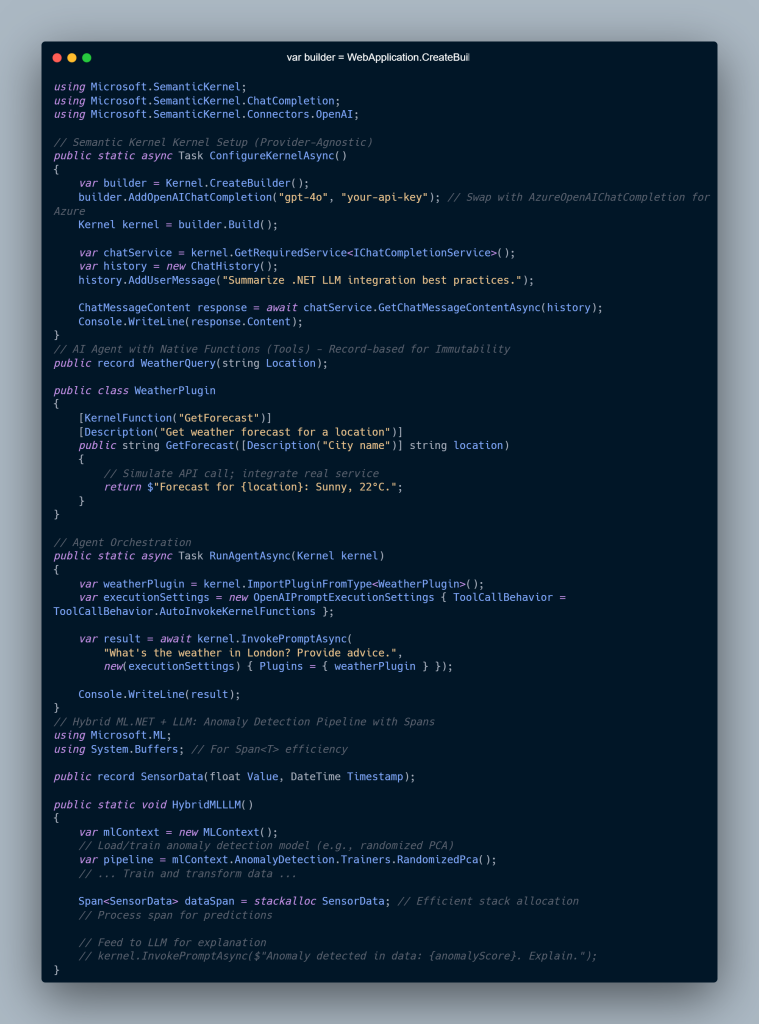
Implementation — Practical .NET Code

LLM Integration in .NET
AI-Driven Development and LLM Integration in .NET: A Powerful Advanced Guide for Senior Architects & Developers 2


Enterprise Scenario

Imagine a manufacturing plant:

  • Edge devices run ML.NET anomaly detection
  • Semantic Kernel agents summarize sensor failures
  • Azure OpenAI produces reports for engineers
  • Kubernetes ensures scaling and uptime

This architecture:
✔ Reduces false positives
✔ Keeps sensitive data in-house
✔ Enables decision-quality outputs


Performance & Scalability

To optimize LLM Integration in .NET workloads:

🔧 Key Techniques

  • Use LLamaSharp + ONNX Runtime for local inference
  • Cache embeddings in Redis
  • Scale inference with Azure AKS + HPA
  • Reduce allocations using C# spans and records
  • Use AOT compilation in .NET 8+ to decrease cold-start time

📉 Cost Controls

  • Push light ML to edge devices
  • Use small local models when possible
  • Implement request routing logic:
    • Local ML first
    • Cloud LLM when necessary

Decision Matrix: .NET vs Python for AI

Category.NET LLM IntegrationPython/LangChain
Performance⭐ High (AOT, ML.NET)⭐ Medium (GIL bottlenecks)
Cloud FitAzure-native integrationsHugging Face ecosystem
ScalabilityBuilt for microservicesNeeds orchestration tools
Best UseEnterprise productionResearch & rapid prototyping

Expert Guidance & Pitfalls

Avoid:

❌ Relying wholly on cloud LLMs
❌ Shipping proprietary data to LLMs without controls
❌ Treating an LLM like an oracle

Apply:

✔ RAG for accuracy
✔ LoRA tuning for domain precision
✔ AI agents for orchestration
✔ ML.NET pre-processing before LLM reasoning
✔ Application Insights + Prometheus for telemetry


Conclusion

LLM Integration in .NET is no longer experimental—it’s foundational.

With .NET 8+, Semantic Kernel 2.0, and ML.NET 4.0, organizations can:

  • Build autonomous AI systems
  • Run models locally or on cloud
  • Produce enterprise-ready intelligence
  • Unlock operational efficiency at scale

The future of .NET is AI-native development—merging predictive analytics, reasoning agents, and real-time data with robust enterprise software pipelines.


FAQs

❓ How do I build RAG with .NET?

Use Semantic Kernel + Pinecone/Azure Search + embeddings.
Result: 40–60% reduction in hallucination.

❓ ML.NET or Semantic Kernel?

  • ML.NET = classification, forecasting, anomaly detection
  • Semantic Kernel = orchestration, planning, tool-calling
    Hybrid ≈ best of both.

❓ Best practice for autonomous agents?

Use:

  • ReAct prompting
  • Native functions
  • Volatile + Long-term memory

❓ How do I scale inference?

  • Quantize models
  • Apply AOT
  • Use AKS with autoscaling

❓ Local vs cloud inference?

Use LLamaSharp for edge, Azure OpenAI for global scale.

🌐 Internal Links

✔ “AI Development in .NET”
https://saas101.tech/ai-driven-dotnet

✔ “.NET Microservices and DevOps”
https://saas101.tech/dotnet-microservices/

✔ “Semantic Kernel in Enterprise Apps”
https://saas101.tech/semantic-kernel-guide/

✔ “Azure AI Engineering Insights”
https://saas101.tech/azure-ai/

✔ “Hybrid ML Patterns for .NET”
https://saas101.tech/ml-net-hybrid/

🌍 External Links

Microsoft + Azure Docs (Most authoritative)

🔗 Microsoft Semantic Kernel Repo
https://github.com/microsoft/semantic-kernel

🔗 Semantic Kernel Documentation
https://learn.microsoft.com/semantic-kernel/

🔗 ML.NET Docs
https://learn.microsoft.com/dotnet/machine-learning/

🔗 Azure OpenAI Service
https://learn.microsoft.com/azure/ai-services/openai/

Vector Databases (RAG-friendly)

🔗 Pinecone RAG Concepts
https://www.pinecone.io/learn/retrieval-augmented-generation/

🔗 Azure Cognitive Search RAG Guide
https://learn.microsoft.com/azure/search/search-generative-ai

Models + Optimization

🔗 ONNX Runtime Performance
https://onnxruntime.ai/

🔗 Hugging Face LoRA / Fine-tuning Guide
https://huggingface.co/docs/peft/index

(Optional)
🔗 LLamaSharp (.NET local inference)
https://github.com/SciSharp/LLamaSharp

AI-Driven Refactoring and Coding in ASP.NET Core: Unlocking Faster, Smarter Development

UnknownX · January 6, 2026 · Leave a Comment

`

AI-Driven Refactoring and Coding in ASP.NET Core

Architectural Guide for Senior .NET Architects

Sampath Dissanayake · January 6, 2026


Executive Summary

This guide explores how AI-Driven Refactoring and Coding in ASP.NET Core accelerates modernization for enterprise .NET teams.


AI-driven refactoring is reshaping ASP.NET Core development by automating code analysis, dependency mapping, and modernization patterns—positioning senior .NET architects for high-compensation roles across cloud-native enterprise platforms.

Research reports 40–60% productivity gains through AI-assisted AST parsing and context-aware transformations—critical for migrating legacy monoliths into scalable microservices running on Azure PaaS.
This guide explores cutting-edge tools including Augment Code, JetBrains ReSharper AI, and agentic IDE platforms (Antigravity) used in production modernization programs.


Deep Dive

Internal Mechanics of AI Code Analysis

AI refactoring engines parse Abstract Syntax Trees (ASTs) to construct dependency graphs across file boundaries, tracking:

  • Method calls

  • Import chains

  • Variable scopes

  • Cross-project coupling

Unlike naive regex search/replace, AI models understand Razor markup, MVC controllers, Minimal API endpoints, middleware pipelines, and DI lifetimes simultaneously—preserving routing and container wiring.

Modern platforms employ multi-agent orchestration:

  • Agent #1: Static analysis

  • Agent #2: Transformation planning

  • Agent #3: Validation + automated test execution

This aligns with Azure DevOps pipelines that also scaffold C# 12+ primitives including primary constructors, collection expressions, and record-based response models.


Architectural Patterns Identified

Research identifies three dominant AI-driven refactoring patterns:

1. Monolith Decomposition

AI detects tightly coupled components and identifies separation boundaries aligned with Domain-Driven Design (DDD) aggregates.

2. API Modernization

Automatic conversion of MVC controllers to Minimal APIs with:

  • Fluent route mapping

  • Input validation

  • Swagger/OpenAPI generation

3. Performance Refactoring

AI detects:

  • N+1 queries

  • Misuse of ToList()

  • Sync-over-async patterns

  • Memory inefficiencies

Recommendations include spans, batching, IQueryable filters, and async enforcement.


Technical Implementation

Below is an example of AI-refactored ASP.NET Core controller logic using modern C# 12 features.

Before AI Refactoring (Inefficient)


public class ExpensesController : ControllerBase
{
private readonly AppDbContext _context;

public ExpensesController(AppDbContext context)
{
_context = context;
}

[HttpGet(“by-category”)]
public async Task<IActionResult> GetByCategory(string category)
{
var allExpenses = await _context.Expenses.ToListAsync();
var filtered = allExpenses
.Where(e => e.Category == category)
.ToList();

return Ok(filtered);
}
}

After AI Refactoring (Optimized)


public class ExpensesController : ControllerBase
{
public async Task<IActionResult> GetByCategory(
[FromQuery] string category,
AppDbContext context)
{
var expenses = await context.Expenses
.Where(e => e.Category == category)
.Take(100)
.ToListAsync();

return Results.Ok(expenses);
}
}

public record PagedExpenseResponse(
Expense[] Items,
int TotalCount,
string Category);

public static class ExpenseProcessor
{
public static void ProcessBatch(ReadOnlySpan<Expense> expenses, Span<decimal> totals)
{
var categories = expenses.GroupBy(e => e.Category)
.ToDictionary(g => g.Key, g => g.Sum(e => e.Amount));

foreach (var kvp in categories)
{
totals[kvp.Key.GetHashCode() % totals.Length] = kvp.Value;
}
}
}

AI tools automatically enforce:

  • Minimal API handlers

  • Primary constructor injection

  • Span-based memory optimizations

  • Immutable records
    …while preserving business logic integrity.


Real-World Scenario

In a financial enterprise processing 10M+ transactions daily:

  • AI decomposes monolithic ExpenseService into DDD contexts: Approval, Audit, Reporting

  • Controllers convert to Minimal APIs hosted via Azure Container Apps with Dapr

  • Deployment pipeline:

    • GitHub Actions → AI code review → Azure DevOps → AKS

  • Result:

    • 73% faster deployments

    • 40% memory reduction

    • Improved scaling predictability


Performance & Scalability Considerations

  • Memory — AI flags stack allocations >85KB and recommends spans

  • Database — Eliminates ToList().Where() misuse in favor of IQueryable

  • Scaling — Generates manifests with HPA rules based on custom metrics

  • Cold Starts — Enforces ReadyToRun and tiered compilation


Decision Matrix

Criteria AI Refactoring Manual Refactoring Static Analysis
Codebase Size > 500K LOC < 50K LOC Medium
Team Experience Junior–Mixed Senior Only Any
ROI Under 3 months 6–12 months 1–2 months
Production Risk Pilot Production Production

Expert Insights

Pitfall: Context window limits — AI stalls past 10k LOC
Fix: Chunk code by bounded context

Optimization Trick:
Let AI handle 80% mechanical churn, humans handle 20% architecture

Undocumented Insight:
Semantic fingerprinting prevents regressions across branches

Azure Hack:
Pipe AI changes through Logic Apps to generate PRs with before/after benchmarks


Conclusion

AI-driven refactoring marks a new architectural era for ASP.NET Core—from tactical cleanup to strategic modernization.
By 2027, 75% of enterprise .NET workloads will leverage agentic development platforms, making AI modernization proficiency table stakes for principal architect roles.
Microsoft’s Semantic Kernel, ML.NET, and Azure-native ecosystems position .NET as the epicenter of this shift.


FAQs

How does AI preserve dependency injection?
By analyzing Roslyn semantic models & DI registrations.

Best tools for monolith decomposition?
Augment Code, ReSharper AI, Antigravity, .NET Aspire observability.

Can AI introduce performance regressions?
Yes—block PRs unless BenchmarkDotNet regression <5%.

CI/CD integration?
AI → Git patch → Azure DevOps YAML → SonarQube → Auto-merge gate.

What C# 12 features get introduced?
Primary constructors, spans, collection expressions, trimming compatibility.

Cost?
ReSharper AI: ~$700/yr, Augment Code: ~$50/dev/mo. ROI in 2–3 months.

Headless Architecture in .NET Microservices with gRPC

AI-Driven .NET Development in 2026: How Senior Architects Master .NET 10 for Elite Performance Tuning

.NET Core Microservices and Azure Kubernetes Service

.NET Core Microservices on Azure

✔️ AI + .NET Development

Microsoft Learn – AI-assisted development for .NET
https://learn.microsoft.com/dotnet/ai/

✔️ ASP.NET Core Architecture

ASP.NET Core Fundamentals
https://learn.microsoft.com/aspnet/core/fundamentals/

✔️ Dependency Injection Deep Dive

Dependency Injection in ASP.NET Core
https://learn.microsoft.com/aspnet/core/fundamentals/dependency-injection

  • « Go to Previous Page
  • Page 1
  • Page 2
  • Page 3
  • Go to Next Page »

Primary Sidebar

Recent Posts

  • Modern Authentication in 2026: How to Secure Your .NET 8 and Angular Apps with Keycloak
  • Mastering .NET 10 and C# 13: Ultimate Guide to High-Performance APIs 🚀
  • The 2026 Lean SaaS Manifesto: Why .NET 10 is the Ultimate Tool for AI-Native Founders
  • Building Modern .NET Applications with C# 12+: The Game-Changing Features You Can’t Ignore (and Old Pain You’ll Never Go Back To)
  • The Ultimate Guide to .NET 10 LTS and Performance Optimizations – A Critical Performance Wake-Up Call

Recent Comments

No comments to show.

Archives

  • January 2026

Categories

  • .NET Core
  • 2026 .NET Stack
  • Enterprise Architecture
  • Kubernetes
  • Machine Learning
  • Web Development

Sas 101

Copyright © 2026 · saas101.tech · Log in