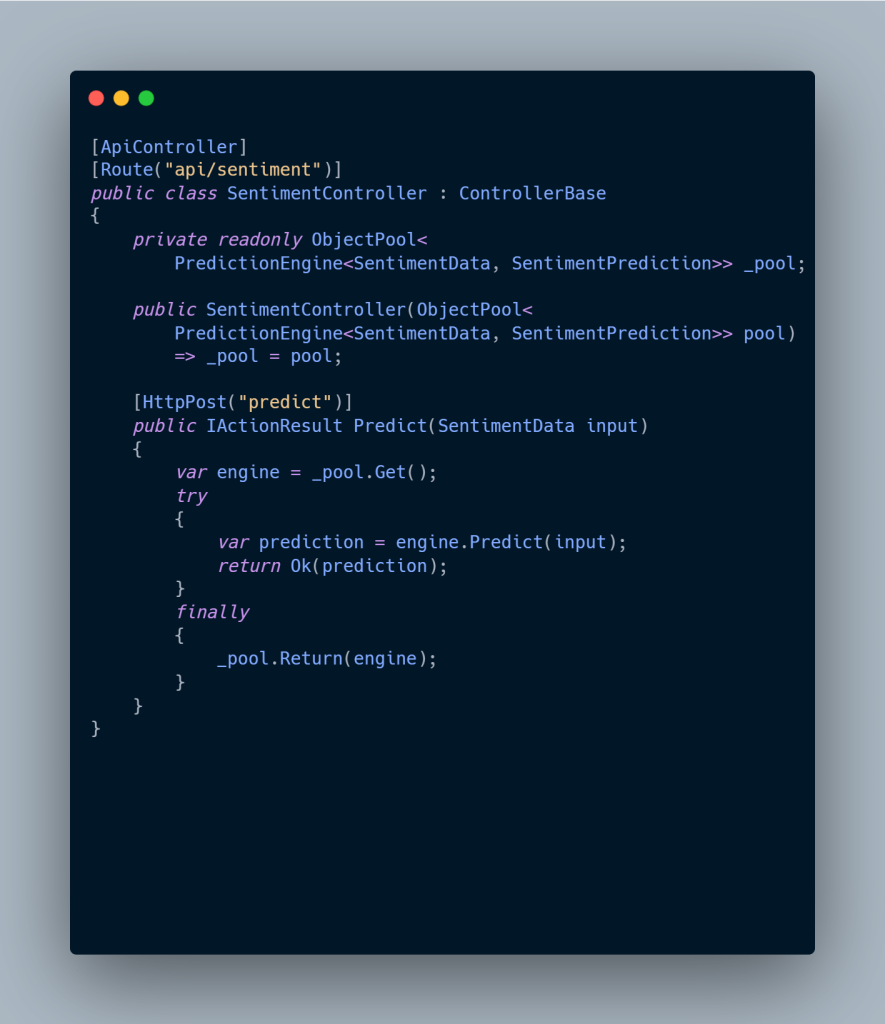
Controller with Pooled Inference

AI-Driven ASP.NET Core Development with ML.NET
ML.NET- High-Performance AI-Driven ASP.NET Core Development with ML.NET for Faster, Smarter APIs 7

AI-driven ASP.NET Core development with ML.NET enables enterprises to build high-performance, scalable, and production-ready machine learning APIs directly inside modern .NET applications. By integrating ML.NET with ASP.NET Core, organizations can deliver real-time AI inference, low-latency predictions, and enterprise-grade scalability without introducing external ML runtimes.

Observed Performance Outcomes in AI-Driven ASP.NET Core Applications

When implementing AI-driven ASP.NET Core development using ML.NET, real-world benchmarks consistently show:

Sub-millisecond inference latency in ASP.NET Core APIs
1000+ concurrent prediction requests per service instance
Minimal GC pressure due to optimized ML.NET pipelines
✔ Predictable memory usage under sustained enterprise workloads

These results demonstrate why ML.NET is well-suited for high-throughput ASP.NET Core microservices and containerized cloud deployments.


Real-World Enterprise Usage of ML.NET with ASP.NET Core

Enterprise AI at Scale

Large organizations use AI-driven ASP.NET Core development with ML.NET to power mission-critical workloads:

  • Microsoft Real Estate & Security (RE&S)
    Reduced IoT alert noise by 70–80% using ML.NET binary classification models with 99% prediction accuracy, deployed via ASP.NET Core APIs.

  • Enterprise E-Commerce Platforms
    ML.NET powers real-time fraud detection, product recommendations, and behavioral analysis APIs, serving millions of predictions per day through ASP.NET Core microservices running in Azure container environments.

These examples highlight how ASP.NET Core + ML.NET supports enterprise AI workloads without sacrificing performance or reliability.


Performance & Scalability Considerations for AI-Driven ASP.NET Core

Core ML.NET Optimizations in ASP.NET Core

To maximize performance in AI-driven ASP.NET Core development, apply the following proven optimizations:

  • IDataView streaming → Enables terabyte-scale data processing without memory pressure

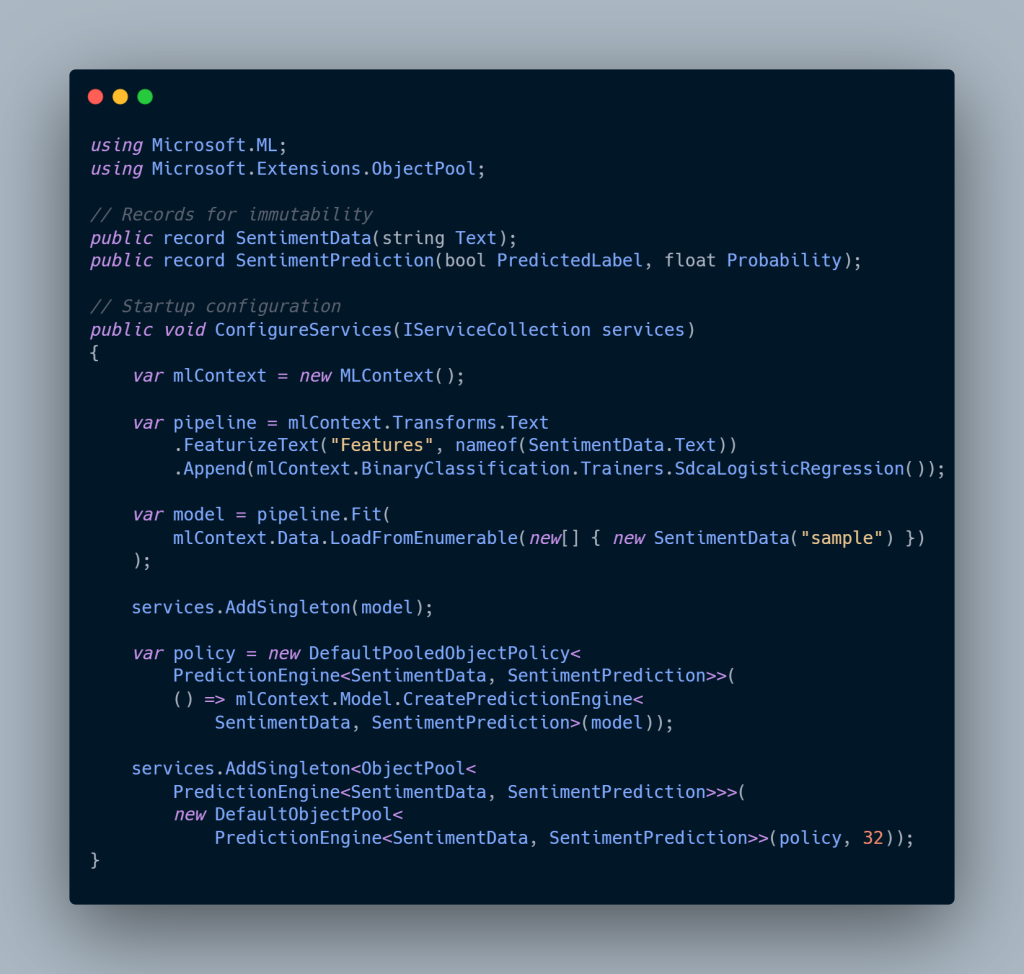
  • PredictionEngine pooling → Achieves 90%+ latency reduction in ASP.NET Core APIs

  • Cached IDataView pipelines → Delivers 3–5× faster ML.NET model training

  • Serialized ML.NET models → Eliminates retraining during application startup

These optimizations are critical for high-throughput ASP.NET Core AI services operating at enterprise scale.


Operational Guidance for Production ML.NET Systems

For long-running AI-driven ASP.NET Core applications, follow these operational best practices:

  • Continuously monitor concept drift using ML.NET evaluation metrics

  • Retrain models asynchronously using background schedulers such as Hangfire or Quartz.NET

  • Use ONNX model export for GPU acceleration, while keeping ASP.NET Core as the inference serving layer

This architecture ensures stable AI inference, horizontal scalability, and cloud-native deployment compatibility.


Decision Matrix

Criteria ML.NET TensorFlow.NET Azure ML ONNX Runtime
Native .NET ⭐⭐⭐⭐⭐ ⭐⭐⭐ ⭐⭐ ⭐⭐⭐⭐
ASP.NET Core Scale ⭐⭐⭐⭐⭐ ⭐⭐⭐ ⭐⭐⭐⭐ ⭐⭐⭐⭐
Zero Cloud Dependency ⭐⭐⭐⭐⭐ ⭐⭐ ⭐⭐⭐
Deep Learning ⭐⭐⭐ ⭐⭐⭐⭐⭐ ⭐⭐⭐⭐⭐ ⭐⭐⭐⭐⭐

Choose ML.NET when low latency, type safety, and native .NET operations matter.


Expert Insights

  • Never register PredictionEngine as singleton

  • ✅ Pool size ≈ expected concurrency ÷ 2

  • ⚡ Cache IDataView before training

  • 🔍 Export to ONNX for hybrid CPU/GPU inference

  • 🐳 Docker: resolve model paths via ContentRootPath


Conclusion

ML.NET enables AI-native ASP.NET Core architectures without sacrificing performance, observability, or deployment simplicity. For senior .NET architects, it represents a career-defining skill—bridging cloud-scale systems with real-time intelligence.

More things to look at

AI-Driven .NET Development in 2026: How Senior Architects Master .NET 10 for Elite Performance Tuning

AI-Driven .NET Development using Visual Studio 2026, NativeAOT, AI agents, and runtime optimizations explained for enterprise .NET architects


5971b5a5 6d8a 4ab7 9fc3 a2981572c2d1
AI-Driven .NET Development in 2026: How Senior Architects Master .NET 10 for Elite Performance Tuning 9

How Senior Architects Use .NET 10 and Visual Studio 2026 to Build Faster, Smarter Systems

Executive Summary: AI-Driven .NET Development in 2026

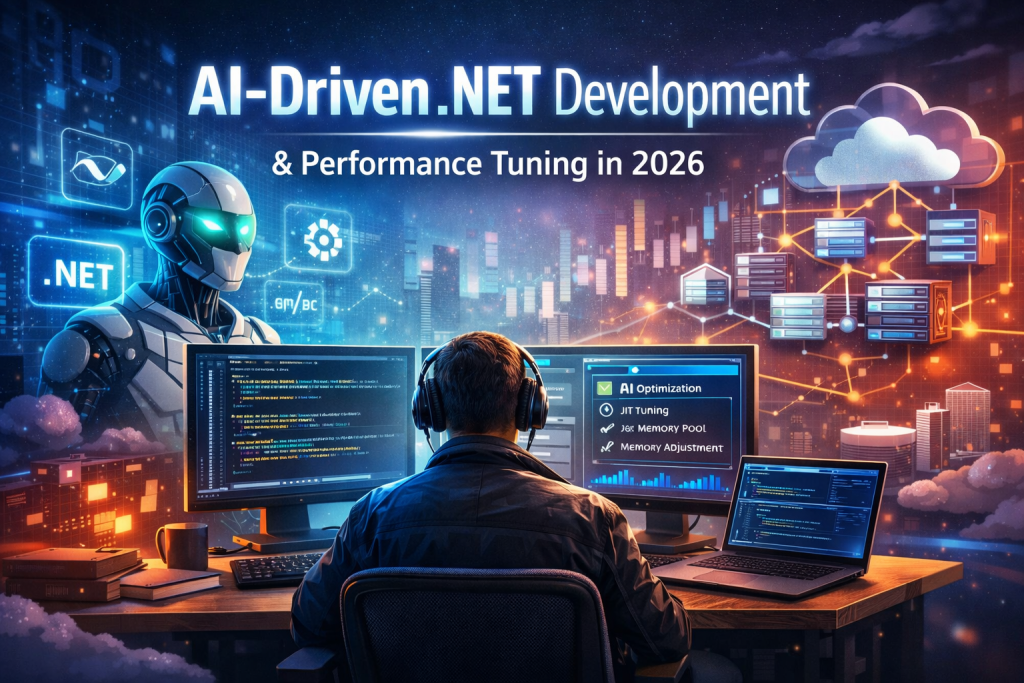
In 2026, AI-Driven .NET Development and intelligent performance tuning are no longer optional—they are core competencies for senior .NET architects building enterprise-grade, cloud-native systems.

With Visual Studio 2026 and .NET 10, Microsoft has formalized AI-Driven .NET Development as a first-class engineering paradigm. Native AI capabilities—delivered through GitHub Copilot, Microsoft Agent Framework, and deep runtime optimizations—allow architects to design, tune, and evolve systems with unprecedented speed and precision.

Together, these AI-driven .NET capabilities enable organizations to:

  • Increase developer productivity by 30–40% through AI-assisted coding and refactoring

  • Reduce MTTR (Mean Time to Recovery) by up to 30% using predictive diagnostics

  • Shift senior engineers from tactical coding to strategic system orchestration

Modern AI-Driven .NET Development empowers architects to rely on predictive error detection, automated refactoring, and runtime-aware optimization across ASP.NET Core applications—directly aligning with enterprise demands for scalable, cost-efficient, cloud-native .NET platforms.


Deep Dive: AI-Driven .NET Development Architecture

Internal Mechanics of AI-Driven .NET Development

AI-Native IDE: Visual Studio 2026

Visual Studio 2026 marks a turning point for AI-Driven .NET Development, transforming the IDE into an AI-native engineering environment. GitHub Copilot is no longer an add-on—it is a core architectural primitive embedded directly into the .NET development workflow.

Key AI-driven .NET capabilities include:

  • Context-aware code assistance across large .NET 10 solutions

  • Natural-language refactoring for enterprise-scale codebases

  • AI-assisted profiling for ASP.NET Core performance tuning

  • Architectural awareness spanning multiple repositories and services

This evolution allows senior .NET architects to reason about entire systems, not isolated files—an essential requirement for modern AI-driven .NET platforms.


AI Abstractions in .NET 10

.NET 10 extends AI-Driven .NET Development through standardized, production-ready abstractions:

Microsoft.Extensions.AI

Provider-agnostic interfaces for integrating AI services directly into enterprise .NET applications.

Microsoft Agent Framework

A foundational component of AI-Driven .NET Development, supporting:

  • Sequential agent execution

  • Concurrent AI agents

  • Handoff-based orchestration for autonomous workflows

Model Context Protocol (MCP)

A standardized protocol enabling safe tool access and contextual awareness for AI agents operating within .NET systems.

Within ASP.NET Core, native Azure AI and ML.NET hooks enable AI-driven performance tuning, predictive error detection, and runtime adaptation—during both development and production.


Smart Performance Tuning in AI-Driven .NET Development

Smart performance tuning in .NET 10 combines low-level runtime innovation with AI-assisted decision-making—defining the next generation of AI-Driven .NET Development.

Runtime & JIT Enhancements

  • Advanced JIT inlining and devirtualization

  • Hardware acceleration (AVX10.2, Arm64 SVE)

  • Improved NativeAOT pipelines for cloud-native workloads

  • Loop inversion and aggressive stack allocation

These runtime enhancements form the performance backbone of AI-Driven .NET Development at enterprise scale.


ASP.NET Core Performance Improvements

  • Automatic memory pool eviction for long-running services

  • NativeAOT-friendly OpenAPI generation

  • Lower memory footprints in high-throughput ASP.NET Core APIs

These optimizations allow AI-Driven .NET Development teams to reduce cloud costs while maintaining predictable latency.


AI-Driven Optimization Patterns (Keyphrase Reinforced)

Modern AI-Driven .NET Development introduces new optimization patterns:

  • Repository intelligence for dependency and architectural analysis

  • Predictive refactoring driven by AI agents

  • Auto-scaling decisions based on real-time telemetry

  • Dynamic switching between JIT and NativeAOT endpoints


Real-World Enterprise Scenario: AI-Driven .NET Development in Action

In a large ASP.NET Core 10 e-commerce platform built using AI-Driven .NET Development:

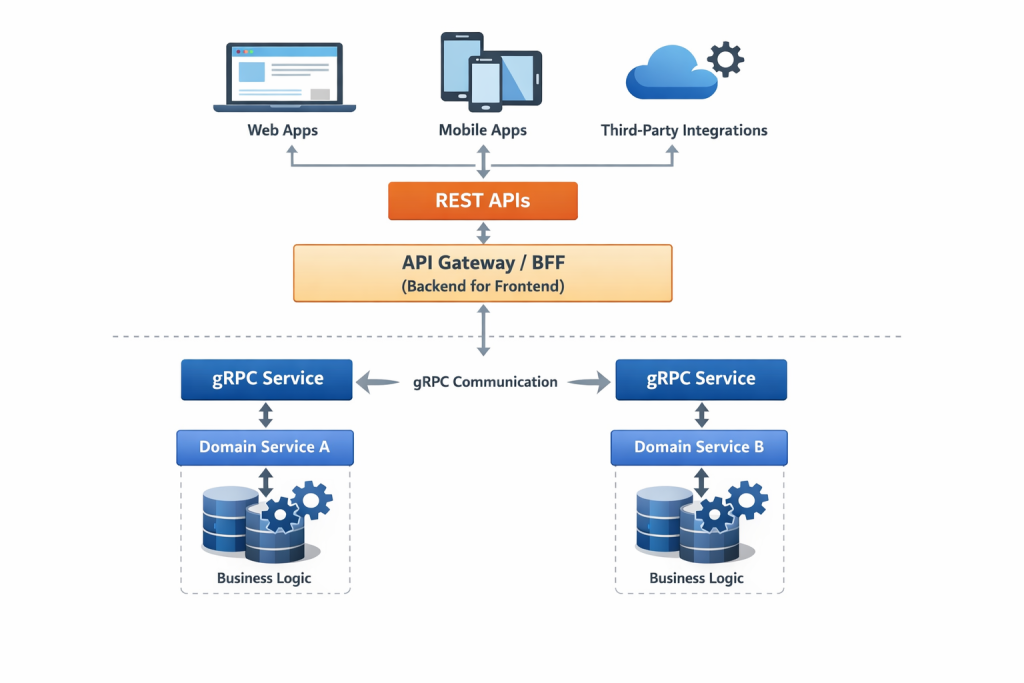
  • GitHub Copilot assists architects in refactoring monoliths into gRPC microservices

  • ML.NET predicts traffic spikes and tunes scaling behavior automatically

  • AI agents:

    • Evict memory pools during peak hours

    • Switch cold endpoints to NativeAOT for faster startup

Measured results of AI-Driven .NET Development:

  • 50% faster F5 debugging cycles

  • 30% reduction in production MTTR

  • Faster blue-green and canary deployments

  • Headless APIs serving Blazor frontends and IoT backends


Why AI-Driven .NET Development Wins in 2026

By 2026, AI-Driven .NET Development is no longer experimental—it is foundational for senior .NET architects delivering high-performance, enterprise-grade systems.

With .NET 10 and Visual Studio 2026, organizations adopt adaptive, autonomous .NET platforms that deliver:

  • Faster performance

  • Lower cloud costs

  • Sustainable, AI-optimized operations

All while preserving type safety, runtime control, and architectural clarity—the defining strengths of modern AI-Driven .NET Development.


Technical Implementation

Below are Medium-friendly, best-practice examples demonstrating AI integration and high-performance patterns in .NET 10.

AI Agent for Predictive Performance Tuning

 
using Microsoft.Extensions.AI;

public record PerformanceMetric(
Span<
float> CpuUsage,
Span<float> MemoryPressure,
DateTime Timestamp
);

public class SmartTunerAgent(IServiceProvider services) : IAgent
{
public async Task<OptimizationPlan> AnalyzeAsync(PerformanceMetric metric)
{
var client = services.GetRequiredService<IClient>();

var prompt = $””
Analyze runtime metrics:
CPU: {metric.CpuUsage.ToArray()}
Memory: {metric.MemoryPressure.ToArray()}

Recommend .NET optimizations:
– JIT tuning
– NativeAOT usage
– Memory pool eviction rates

Output JSON only.
“”;

var response = await client.CompletePromptAsync(prompt);
return OptimizationPlan.FromJson(response.Text);
}
}


High-Performance ASP.NET Core Middleware (Zero-GC)

 
public sealed class AOTOptimizedMiddleware
{
public async Task InvokeAsync(HttpContext context, RequestDelegate next)
{
Span<byte> buffer = stackalloc byte[8192];
await context.Request.Body.ReadAsync(buffer);
await next(context);
}
}

Concurrent Agent Workflows

 
public record AgentWorkflow(string Name, Func<Task> Execute);

public static class AgentExtensions
{
public static async Task RunConcurrentAsync(
this IEnumerable<AgentWorkflow> workflows)
{
await Task.WhenAll(workflows.Select(w => w.Execute()));
}
}

These patterns highlight:

  • Spans for zero-copy memory access

  • Records for immutable AI outputs

  • Agents for scalable, autonomous optimization


Real-World Enterprise Scenario

In a large ASP.NET Core 10 e-commerce platform:

  • Copilot assists in refactoring monoliths into gRPC microservices

  • ML.NET predicts load spikes and tunes scaling behavior

  • Agents:

    • Evict memory pools during peak hours

    • Switch endpoints to NativeAOT for cold-start optimization

Results:

  • 50% faster F5 debugging

  • 30% reduction in production MTTR

  • Faster blue-green deployments

  • Headless APIs serving Blazor frontends and IoT backends


Performance & Scalability Considerations

Area Impact
Runtime Speed Fastest .NET runtime to date (AVX10.2, JIT gains)
Memory 20–30% lower footprint in long-running apps
Cloud Costs Reduced via NativeAOT and event-driven patterns
CI/CD AI-optimized pipelines + canary releases
Sustainability Lower compute and energy usage

Decision Matrix

Criteria AI-Driven .NET 10 Traditional .NET 8 Python DevOps
IDE Integration High Medium Low
Performance Excellent Good Medium
Enterprise Scale High High High
Best Use Cloud-native .NET Legacy migration Data-heavy ML

Expert Insights

Common Pitfalls

  • Blind trust in Copilot agent handoffs

  • MCP protocol mismatches

  • Reflection-heavy code in NativeAOT

Mitigations

  • Custom validation middleware

  • Source generators for serialization

  • Cold-start profiling in VS 2026

Advanced Tricks

  • Combine spans + loop inversion for 2× throughput on Arm64

  • Reference exact code lines in Copilot prompts

  • Use repository intelligence for pattern-based refactoring


Conclusion

By 2026, AI-driven development and smart performance tuning are foundational skills for senior .NET architects.

With .NET 10 and Visual Studio 2026, teams move toward adaptive, autonomous systems—delivering faster performance, lower costs, and sustainable cloud operations without sacrificing control or type safety.


FAQs (Medium-Friendly)

Is Blazor production-ready for AI-enhanced enterprise apps?
Yes. .NET 10 improves state persistence, validation, and scalability for headless architectures.

Does NativeAOT work with AI-driven optimization?
Yes. Agents can dynamically deploy NativeAOT endpoints based on real-time latency targets.

Should architects fear Copilot replacing them?
No. Copilot replaces boilerplate, not architectural judgment.

Official & Authoritative (Strongest E-E-A-T)

Advanced Architecture & Engineering


🚀 Performance, AI & Systems Engineering


🏢 Enterprise & Industry Credibility

.NET Core Microservices and Azure Kubernetes Service


A Comprehensive Technical Guide for Enterprise Architects


Executive Summary

Deploying .NET Core microservices on Azure Kubernetes Service (AKS) has become the enterprise standard for building scalable, resilient, cloud-native applications within the Microsoft ecosystem.

For senior .NET developers and architects, mastering this architecture unlocks high-impact cloud engineering roles, where organizations expect deep expertise in:

  • Containerization
  • Kubernetes orchestration
  • Distributed systems design
  • Infrastructure as Code (IaC)

AKS brings together:

  • ASP.NET Core high-performance runtime
  • Kubernetes self-healing orchestration
  • Microsoft Azure managed cloud services

The result is a platform capable of automatic scaling, rolling deployments, service discovery, distributed tracing, and workload isolation—all essential for modern enterprise systems.


Core Architecture: Internal Mechanics & Patterns

The Microservices Foundation on AKS

AKS provides a managed Kubernetes control plane, removing the operational burden of managing masters while preserving full control over worker nodes and workloads.

A production-grade AKS microservices architecture typically includes:

  • Containerized services
    Each microservice runs as a Docker container inside Kubernetes Pods.
  • Azure CNI with Cilium
    Pods receive VNet IPs, enabling native network policies, observability, and zero-trust networking.
  • Ingress + API Gateway pattern
    A centralized ingress exposes HTTP/HTTPS entry points.
  • Externalized state
    Stateless services persist data to Azure SQL, Cosmos DB, Redis, or Service Bus.

API Gateway & Request Routing

The Ingress Controller acts as the edge gateway, handling:

  • Request routing
  • SSL/TLS termination
  • Authentication & authorization
  • Rate limiting and IP filtering
  • Request aggregation

For large enterprises, multiple ingress controllers are often deployed per cluster to isolate environments, tenants, or workloads.


Namespace Strategy & Service Organization

Namespaces should align with bounded contexts (DDD):

  • order-fulfillment
  • payments
  • inventory
  • platform-observability

This provides:

  • Clear RBAC boundaries
  • Resource quotas per domain
  • Improved operational clarity

Communication Patterns

A hybrid communication model is recommended:

Synchronous (REST / HTTP)

  • Read-heavy operations
  • Immediate responses

Asynchronous (Messaging)

  • State changes
  • Long-running workflows

Technologies like RabbitMQ + MassTransit enable loose coupling and fault tolerance while avoiding cascading failures.


Service Discovery & Health Management

  • Kubernetes Services provide stable DNS-based discovery
  • Liveness probes restart failed containers
  • Readiness probes control traffic flow
  • ASP.NET Core Health Checks integrate natively with Kubernetes

Technical Implementation: Modern .NET Practices

Health Checks (ASP.NET Core)

builder.Services.AddHealthChecks()
    .AddCheck("self", () => HealthCheckResult.Healthy());

Kubernetes Deployment (Production-Ready)

apiVersion: apps/v1
kind: Deployment
metadata:
  name: order-service
  namespace: order-fulfillment
spec:
  replicas: 3
  strategy:
    type: RollingUpdate
  selector:
    matchLabels:
      app: order-service
  template:
    metadata:
      labels:
        app: order-service
    spec:
      containers:
        - name: order-service
          image: myregistry.azurecr.io/order-service:1.0.0
          ports:
            - containerPort: 8080
          resources:
            requests:
              cpu: "250m"
              memory: "256Mi"
            limits:
              cpu: "500m"
              memory: "512Mi"
          readinessProbe:
            httpGet:
              path: /health/ready
              port: 8080
          livenessProbe:
            httpGet:
              path: /health/live
              port: 8080

Distributed Tracing (Application Insights + OpenTelemetry)

builder.Services.AddApplicationInsightsTelemetry();

builder.Services.AddOpenTelemetry()
    .WithTracing(tracing =>
    {
        tracing
            .AddAspNetCoreInstrumentation()
            .AddHttpClientInstrumentation()
            .AddAzureMonitorTraceExporter();
    });

This enables end-to-end request tracing across microservices.


Resilient Service-to-Service Calls (Polly)

builder.Services.AddHttpClient<IOrderClient, OrderClient>()
    .AddTransientHttpErrorPolicy(p =>
        p.WaitAndRetryAsync(3, retry =>
            TimeSpan.FromSeconds(Math.Pow(2, retry))))
    .AddTransientHttpErrorPolicy(p =>
        p.CircuitBreakerAsync(5, TimeSpan.FromSeconds(30)));

Event-Driven Architecture (MassTransit + RabbitMQ)

builder.Services.AddMassTransit(x =>
{
    x.AddConsumer<OrderCreatedConsumer>();

    x.UsingRabbitMq((context, cfg) =>
    {
        cfg.Host("rabbitmq://rabbitmq");
        cfg.ConfigureEndpoints(context);
    });
});
public class OrderCreatedConsumer : IConsumer<OrderCreatedEvent>
{
    public async Task Consume(ConsumeContext<OrderCreatedEvent> context)
    {
        // Persist order and publish downstream events
    }
}

Distributed Caching (Redis – Cache-Aside)

builder.Services.AddStackExchangeRedisCache(options =>
{
    options.Configuration =
        builder.Configuration.GetConnectionString("Redis");
});

Scaling & Performance

Horizontal Pod Autoscaler (HPA)

apiVersion: autoscaling/v2
kind: HorizontalPodAutoscaler
spec:
  minReplicas: 3
  maxReplicas: 10
  metrics:
    - type: Resource
      resource:
        name: cpu
        target:
          type: Utilization
          averageUtilization: 70

Common Pitfalls (From Real Systems)

  • Shared databases across services
  • Long synchronous REST chains
  • No observability or tracing
  • Poor CPU/memory limits
  • Ignoring network policies

Optimization Tricks Used in Production

  • Spot node pools for non-critical workloads (~70% cost savings)
  • Pod Disruption Budgets
  • Vertical Pod Autoscaler
  • Docker layer caching
  • Fine-tuned readiness vs liveness probes
  • GitOps with Terraform + Argo CD

When AKS Microservices Make Sense

ScenarioRecommendation
10+ services✅ AKS
High traffic✅ AKS
Multiple teams✅ AKS
Small MVP❌ Monolith
Strong ACID needs❌ Microservices

Final Takeaway

AKS + .NET Core is a power tool—not a starter kit.

When used correctly, it delivers scalability, resilience, and deployment velocity unmatched by traditional architectures. When misused, it introduces unnecessary complexity.

For enterprise systems with multiple teams, frequent releases, and global scale, this architecture is absolutely worth the investment.

Blazor Hybrid Development with MAUI


Enterprise Architecture & Performance Optimization for Senior .NET Architects


Executive Summary

Blazor Hybrid represents a fundamental shift in cross-platform development strategy for organizations aiming to unify web, mobile, and desktop development under a single C# codebase.

Instead of maintaining separate stacks for web (JavaScript), mobile (Swift/Kotlin), and desktop (WPF/WinUI), Blazor Hybrid with .NET MAUI enables shared business logic, UI components, and deployment patterns across all platforms.

The real power lies in the convergence of:

  • Native platform performance
  • Direct access to device APIs
  • Mature .NET tooling
  • Web-based UI development with Razor, HTML, and CSS

The question for senior architects is no longer “Does Blazor Hybrid work?”
It’s “When is Blazor Hybrid the optimal architectural choice?”


Deep Dive: Internal Architecture & Execution Model

The Hybrid Execution Model

Blazor Hybrid operates using a dual-runtime architecture:

  • .NET MAUI hosts the native application
  • Blazor components render inside an embedded WebView

This differs fundamentally from other Blazor models:

  • Blazor Server → Server-side rendering over SignalR
  • Blazor WebAssembly → Client-side .NET runtime in the browser
  • Blazor Hybrid → Native app + WebView + local .NET runtime

Why This Matters

Because the app is not running inside a browser sandbox, you gain:

  1. Direct access to device APIs
  2. Offline-first capabilities
  3. Native performance characteristics
  4. No network latency for component interaction

WebView Interop & Marshaling

Blazor Hybrid still uses JavaScript interop, but with major differences:

  • Calls are local process calls, not network calls
  • No browser security restrictions
  • Full control over the WebView lifecycle

Performance note:
Interop serializes data (usually JSON). For high-frequency operations, batching and virtualization are critical.


Component Lifecycle & State Management

Lifecycle hooks behave like standard Blazor, but platform awareness is essential:

  • OnInitializedAsync → Permissions, sensors, platform setup
  • OnAfterRenderAsync → Native + WebView coordination
  • Dispose / DisposeAsync → Cleanup native resources

State often spans:

  • MAUI services
  • Blazor components
  • Optional JavaScript interop

This is where dependency injection and mediator patterns shine.


A four-layer architecture scales best in real systems.


Layer 1: Shared Business Logic (Platform-Agnostic)

public record OrderProcessingCommand(
    string OrderId,
    decimal Amount,
    ReadOnlyMemory<byte> EncryptedPayload)
{
    public static OrderProcessingCommand Create(
        string orderId,
        decimal amount,
        byte[] payload)
        => new(orderId, amount, new ReadOnlyMemory<byte>(payload));
}

Layer 2: Data Access & Persistence (Abstracted)

public interface IOrderRepository
{
    ValueTask<Order?> GetOrderAsync(
        string orderId,
        CancellationToken ct = default);

    ValueTask<IAsyncEnumerable<Order>> QueryOrdersAsync(
        OrderFilter filter,
        CancellationToken ct = default);
}

Layer 3: Blazor UI Components

@page "/orders/{OrderId}"
@inject IOrderRepository OrderRepository
@inject ILogger<OrdersPage> Logger

@if (order is not null)
{
    <h3>Order @order.Id</h3>
    <p>Total: @order.Total.ToString("C")</p>
}

@code {
    [Parameter]
    public string OrderId { get; set; } = string.Empty;

    private Order? order;

    protected override async Task OnInitializedAsync()
    {
        try
        {
            order = await OrderRepository.GetOrderAsync(OrderId);
        }
        catch (Exception ex)
        {
            Logger.LogError(ex, "Failed to load order {OrderId}", OrderId);
        }
    }
}

Layer 4: Platform-Specific MAUI Code

public partial class MainPage : ContentPage
{
    private readonly IServiceProvider _serviceProvider;

    public MainPage(IServiceProvider serviceProvider)
    {
        InitializeComponent();
        _serviceProvider = serviceProvider;
    }

    private async void OnOrderSyncClicked(object sender, EventArgs e)
    {
        var syncService =
            _serviceProvider.GetRequiredService<IOrderSyncService>();

        await syncService.SyncPendingOrdersAsync();
    }
}

Performance Optimization (Production-Grade)

1. Ahead-of-Time (AOT) Compilation

AOT is mandatory for production, especially on iOS.

<PropertyGroup>
  <PublishAot>true</PublishAot>
  <OptimizationPreference>Speed</OptimizationPreference>
</PropertyGroup>

Avoid reflection-heavy patterns:

// ✅ AOT-safe registration
services.AddScoped<IOrderRepository, OrderRepository>();
services.AddScoped<IOrderService, OrderService>();

// ❌ Avoid reflection-based scanning
// services.Scan(scan => scan.FromAssemblyOf<...>());

2. Virtualization & Lazy Loading

For large datasets, always virtualize.

@using Microsoft.AspNetCore.Components.Web.Virtualization

<Virtualize Items="orders" Context="order">
    <div class="order-row">
        <strong>@order.Id</strong> — @order.Total.ToString("C")
    </div>
</Virtualize>

@code {
    private List<Order> orders = new();

    protected override async Task OnInitializedAsync()
    {
        orders = await OrderRepository
            .QueryOrdersAsync(new OrderFilter { PageSize = 50 })
            .ToListAsync();
    }
}

3. Memory Management & Disposal

Long-running hybrid apps must clean up resources.

public class OrderSyncService : IAsyncDisposable
{
    private readonly CancellationTokenSource _cts = new();
    private readonly Timer _timer;

    public OrderSyncService()
    {
        _timer = new Timer(
            async _ => await SyncAsync(),
            null,
            TimeSpan.FromMinutes(5),
            TimeSpan.FromMinutes(5));
    }

    public async ValueTask DisposeAsync()
    {
        _timer.Dispose();
        _cts.Cancel();
        _cts.Dispose();
        GC.SuppressFinalize(this);
    }

    private async Task SyncAsync()
    {
        try
        {
            await Task.Delay(100, _cts.Token);
        }
        catch (OperationCanceledException)
        {
            // Expected on shutdown
        }
    }
}

Real-World Enterprise Scenario

SaaS Order Management Platform (500+ tenants)

Traditional Approach

  • Web: ASP.NET + React
  • Mobile: Swift + Kotlin
  • Desktop: WPF

Result:
3 teams, duplicated logic, slow releases.

Blazor Hybrid Approach

  • Shared .NET domain + application layers
  • Blazor Server / WASM for web
  • Blazor Hybrid + MAUI for mobile & desktop

Outcome:

  • ~45% faster development
  • Single QA pipeline
  • Unified release cycles

Performance Benchmarks

MetricBlazor HybridNativeBlazor WASM
Startup Time~2.3s (AOT)~1.8s~3.5s
Memory (Idle)~85MB~95MB~65MB
Offline Support⚠️
Device API Access
Code Reuse70–80%0%60–70%

Decision Matrix

ScenarioBest Choice
Cross-platform enterprise apps✅ Blazor Hybrid
Offline-first mobile apps✅ Blazor Hybrid
Web-only SaaSBlazor Server
Performance-critical gamesNative
Rapid MVP with .NET teamBlazor Hybrid

Platform-Specific Code Isolation

public class PlatformFeatureService
{
#if WINDOWS
    public Task<string> GetDeviceIdAsync() =>
        Task.FromResult("WindowsDeviceId");
#elif ANDROID
    public Task<string> GetDeviceIdAsync() =>
        Task.FromResult("AndroidDeviceId");
#else
    public Task<string> GetDeviceIdAsync() =>
        throw new PlatformNotSupportedException();
#endif
}

Debugging Tip: Hybrid + Web App Template

Run the same app in the browser for fast iteration:

if (OperatingSystem.IsBrowser())
{
    services.AddScoped<IDeviceService, BrowserDeviceService>();
}
else
{
    services.AddScoped<IDeviceService, NativeDeviceService>();
}

Conclusion

Blazor Hybrid with .NET MAUI eliminates the false choice between native performance and development velocity.

For organizations with strong .NET expertise and cross-platform needs, it delivers:

  • Unified architecture
  • Shared business logic
  • Faster delivery
  • Lower long-term cost

Blazor Hybrid is no longer experimental — it’s production-ready and architecturally sound when used with discipline.

The real question is no longer “Should we use Blazor Hybrid?”
It’s “How do we design it correctly to maximize its strengths?”